Creating Pre-order Rules for Different Products and Customer Segments
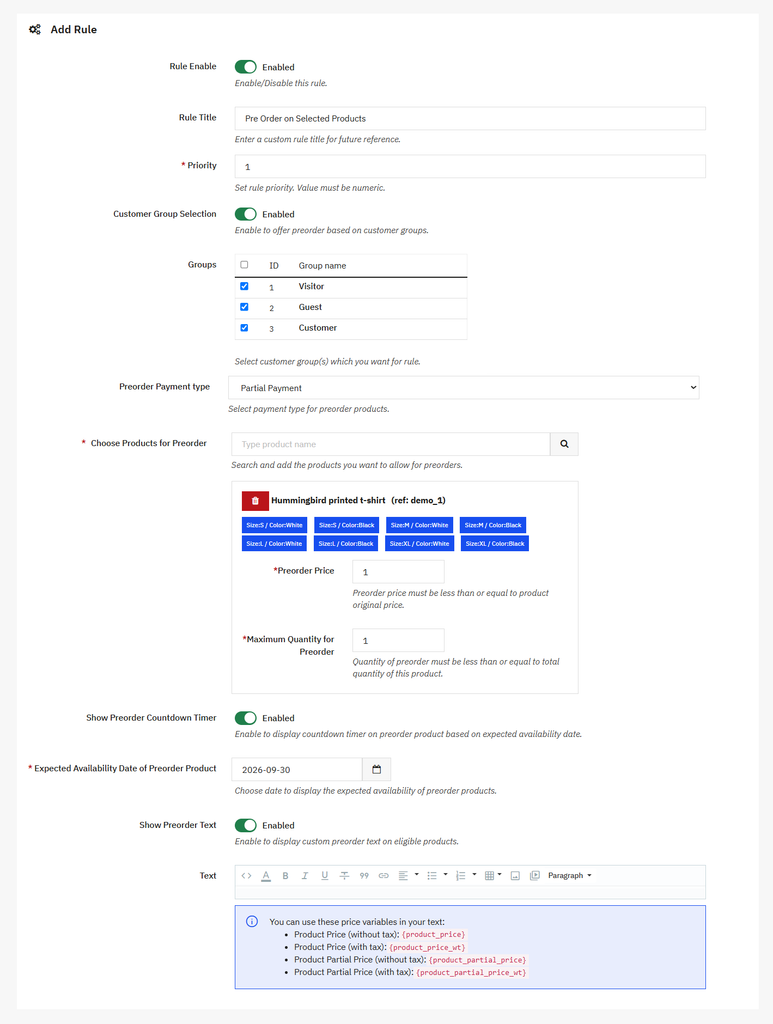
You can make any product available for pre-order using the PrestaShop Advance Pre-Order module. Install and activate the module, then go to Module > Module Manager > Addify Pre Order and select Configure. Now, from the main menu, select Preorder Product Rules and click “+” to create a new rule. For a detailed overview, follow these steps:
- Activate Rule and add a custom rule title and priority
- Enable Custom Group Selection if you want to restrict the pre-order to specific customer groups
- Select required Preorder Payment Type as Full Payment, Partial Payment, or Dynamic Payment
- Select the products you want to make available for pre-order
- Once you have selected the product from the dropdown, choose specifc combinations you want to include or exclude from pre-orders
- At the bottom of the table, you can see a new field “Maximum Quantity for Pre-order”. Here you can limit the number of items customers can pre-order.
- Set the expected availability date and enable the live countdown timer
- Add custom pre-order text and save the rule.