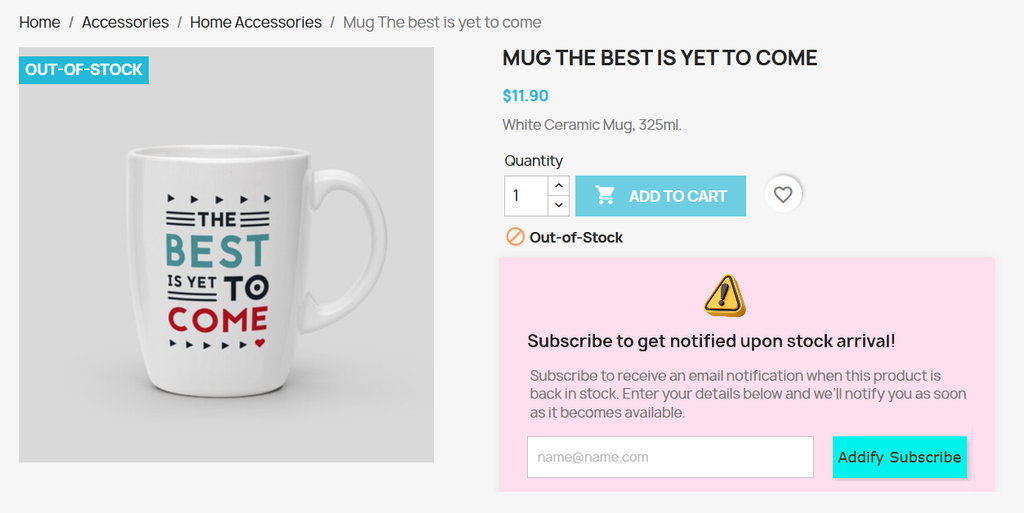
Overview of PrestaShop Stock Alert
What does the module do
PrestaShop Stock Alert Module lets you add a new “Subscribe Now” or “Notify Me” button on product pages, allowing customers to sign in and get instant alerts when the specific product is back in stock. You can customize the subscription form using custom text, fonts, and icons. The module also creates a dedicated “Stock Alert” tab on customer’s My Account Page and keeps them updated about the stock details. You can add subscription/unsubscription success messages, allow users to unsubscribe anytime, and recover lost sales while improving the overall shopping experience.
Features
- Send automatic email alerts when products are back in stock
- Add a “Notify Me” or “Subscribe” button on out-of-stock product pages
- Create a new “Stock Alert” tab on customer’s My Account page
- Choose to display customer data on customers’ account
- Allow users to activate or deactivate email alerts anytime
- Display a subscription form for out-of-stock products
- Choose to show custom messages or notifications upon stock subscription
- Send automated stock alert subscription emails
- Upload a custom icon image on the subscription form
- Manage customer subscription details from a backend stock alert log
Customization Options
- Style subscription button by adding custom
- Text
- Button text color
- Button background color
- Button text size
- Select subscription button style as:
- Default
- Bold
- Italic
- Bold + Italic
- Add a custom placeholder for the subscription email field
- Write a custom title and description for stock alert email
- Style subscription form by adding custom:
- Title color
- Background color
- Title size
- Title font
- Select form title style as:
- Default
- Bold
- Italic
- Bold + Italic
- Select icon style as:
- Default
- Round
- Square
- Select form icon placement as:
- Top left
- Top middle
- Top right
- Add custom text for unsubscribe button
- Style unsubscribe button by adding custom:
- Text color
- Background color
- Text size
- Text font
- Add unsubscribe button text style as:
- Default
- Bold
- Italic
- Bold + Italic
- Display confirmation message on unsubscription
- Add a custom message title and description for unsubscription
- Add a custom success message on:
- Subscription
- Unsubscription
- Resubscription