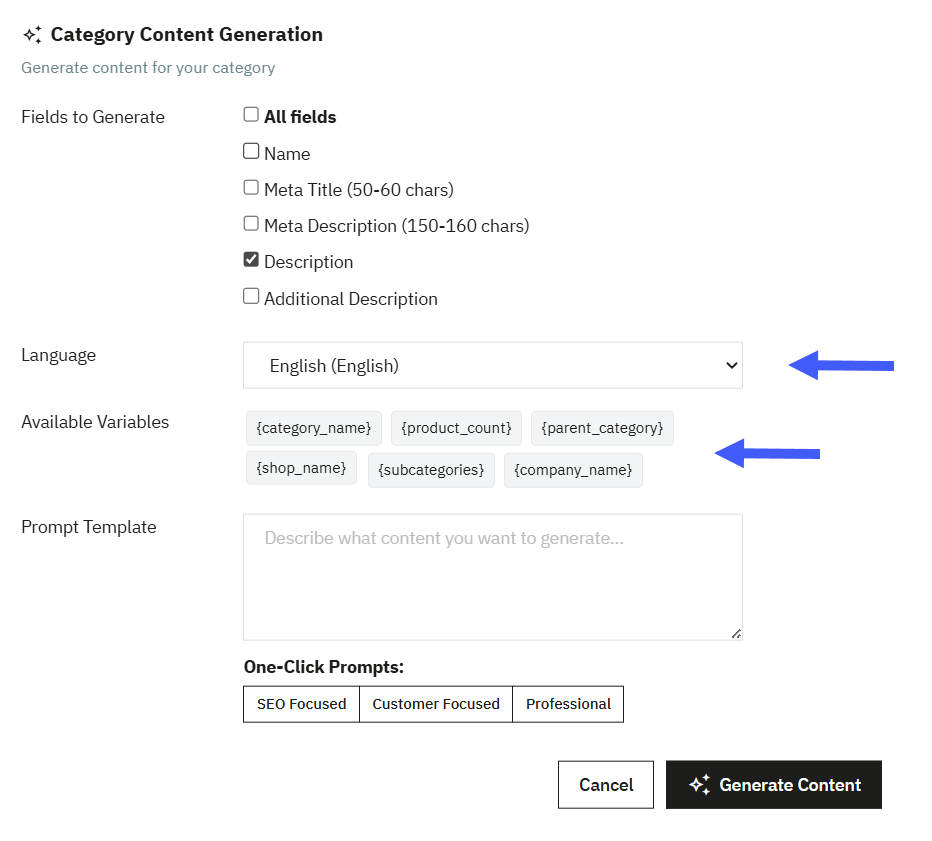
Configure AI Settings
From this section, you can:
- Enable Module: activate the option to enable the module. You can deactivate the option to disable the module anytime.
- Model Type: from the dropdown select AI model as:
- Free Models: select this option to use free content generation
- Free Gemini Model: From the dropdown, you can select from the following Gemini models to use with the free tier
- Gemini 2.5 Flash
- Gemini 2.5 Flash Lite
- Free Gemini Model: From the dropdown, you can select from the following Gemini models to use with the free tier
- Free Models: select this option to use free content generation
- Google Gemini API Key ( Free Tier): Enter your Google Gemini API key below, or use the link provided to generate a new one.
- Steps to Create a New Gemini Key: Click the link provided under the Google Gemini API Key field
- In Google AI Studio, select “Create API Key.”
- Enter the name of the key
- Search or create a Google Cloud Project
- Select “Create Key”
- Copy the generated API key from the pop-up window
- Return to your PrestaShop store and paste the key into the Google Gemini API Key field
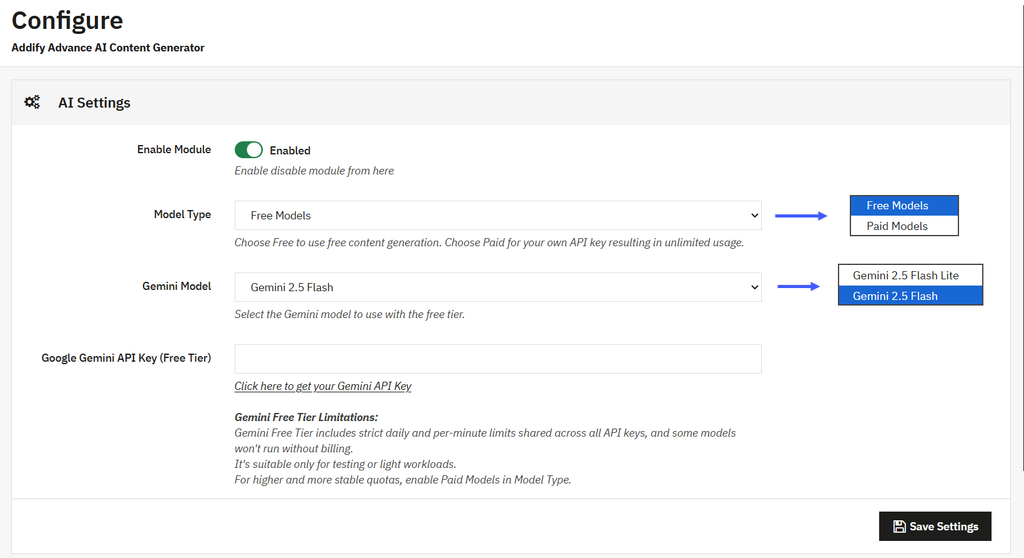
- Paid Models: select this option to generate unlimited content
- Paid Provider: From the dropdown, you can select from the following AI models to use with the paid tier
- OpenAI ChatGPT: Select this option if you want to generate content using ChatGPT.
- OpenAI API Key: enter the secret key for your OpenAI model
- OpenAI Model: You can select from folowing Open AI Models:
- GPT-4o
- GPT-4o mini
- GPT-4 turbo
- Google Gemini: Select this option if you want to generate content using Gemini
- Google Gemini API Key: Enter the API key for your selected AI model
- Gemini Model: You can select from the following OpenAI models:
- Gemini 2.5 Flash
- Gemini 3 Flash
- Gemini 3 Pro
- Test Connection: select this option if you want to test the connection with the entered API key.
Generating AI Content for Products
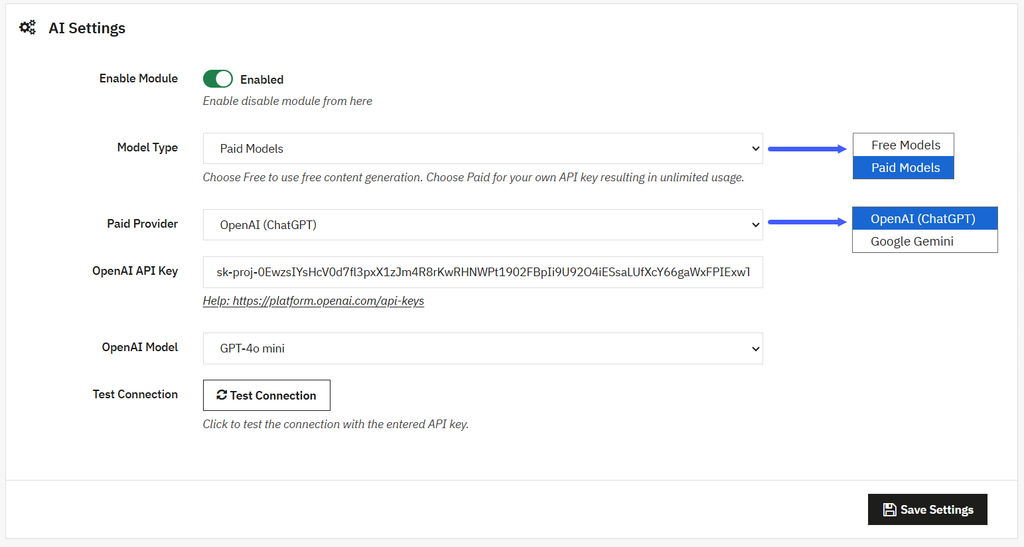
Once you have configured the AI model. Go to the PrestaShop Store Admin panel > Catalog > Products. From the list, you can select any product for which you want to generate content, such as product descriptions, SEO meta titles, or more. Open the desired product and select the “AI Content Generation” field. From the popup you can configure the following details:
- Fields to generate: from the list, select the following fields for AI Content Generation:
- All available fields
- Product name
- Short description
- Product description
- Product meta title
- Product meta description
- Language: from the dropdown, select a specific language for the content
- Available Variables: Use the following variables in your prompt template to generate personalized and relevant content:
- {product_name}
- {category}
- {brand}
- {price}
- {features}
- {description}
- {reference}
- {meta_title}
- {short_description}
- {meta_description}
- Prompt Template: Enter a custom prompt to generate content according to your needs.
- One-click Prompts: Select from the following predefined prompt styles to instantly generate content according to your needs:
- Professional
- SEO-optimized
- Customer-focused
- Luxury
Generating AI Content for Categories
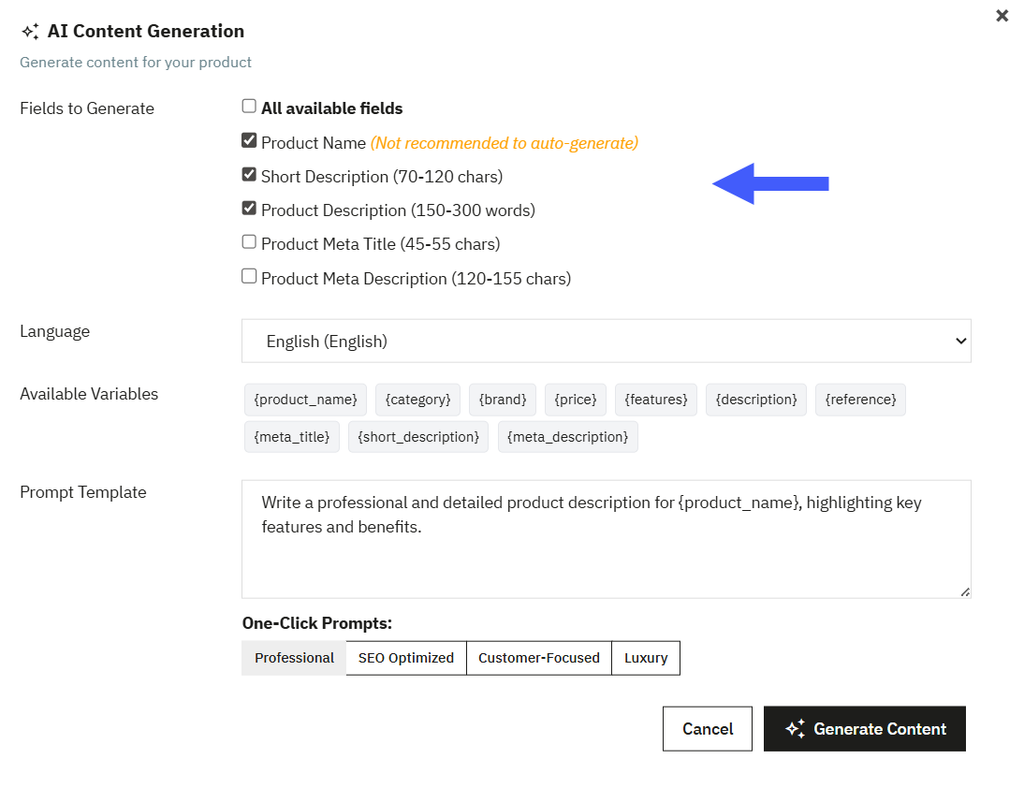
Once you have configured the AI model. Go to the PrestaShop Store Admin panel > Catalog > Categories. From the list, you can select any category for which you want to generate content, such as product descriptions, SEO meta titles, or more. Click Edit for the desired category and select the “AI Content Generation” field. From the popup you can configure the following details:
- Fields to generate: from the list, select the following fields:
- All available fields
- Product name
- Short description
- Product description
- Product meta title
- Product meta description
- Language: select the preferred language for content generation from the dropdown menu.
- Available Variables: Use the following variables in your prompt template to generate personalized and relevant content:
- {product_name}
- {category}
- {brand}
- {price}
- {features}
- {description}
- {reference}
- {meta_title}
- {short_description}
- {meta_description}
- Prompt Template: Enter a custom prompt to generate content according to your needs.
- One-click Prompts: Select from the following predefined prompt styles to instantly generate content according to your needs:
- Professional
- SEO-optimized
- Customer-focused
- Luxury