


PrestaShop Product Sold Counter Module
Encourage your customers to make purchases by displaying the number of items already sold, building trust and boosting confidence in your products. With the Addify Product Sold Counter module, you can easily showcase a customizable sales counter on both product and listing pages. Set a specific sales threshold to control when the counter appears, and add personalized text before and after the counter for added impact. Plus, customize the font styles and color schemes to align the counter with your brand, making it visually appealing and more effective in driving sales.
Prefer buying from the Official PrestaShop Addons Marketplace? Check out our module Here
Key Features:
- Showcase a sales counter to inform users of items sold
- Add custom text before and after the sales counter
- Choose to show the counter on the product and listing pages
- Display sales counter for specific products and user roles
- Fully customize the counter text, font, and color schemes

V1.7.0.0 to V9.0.0
-
Marketplace Verified
-
Extension Partner
-
$79$69 Now
then billed annually at $20 / year and a $49 sign-up fee
- 1 year free support
- 1 year extension updates
30 DAYS MONEY BACK GUARANTEE
Your money is secure with our buyer protection. Claim a full refund for any reason.
Detailed Features of PrestaShop Product Sale Count
Build Trust by Showing the Number of Products Sold
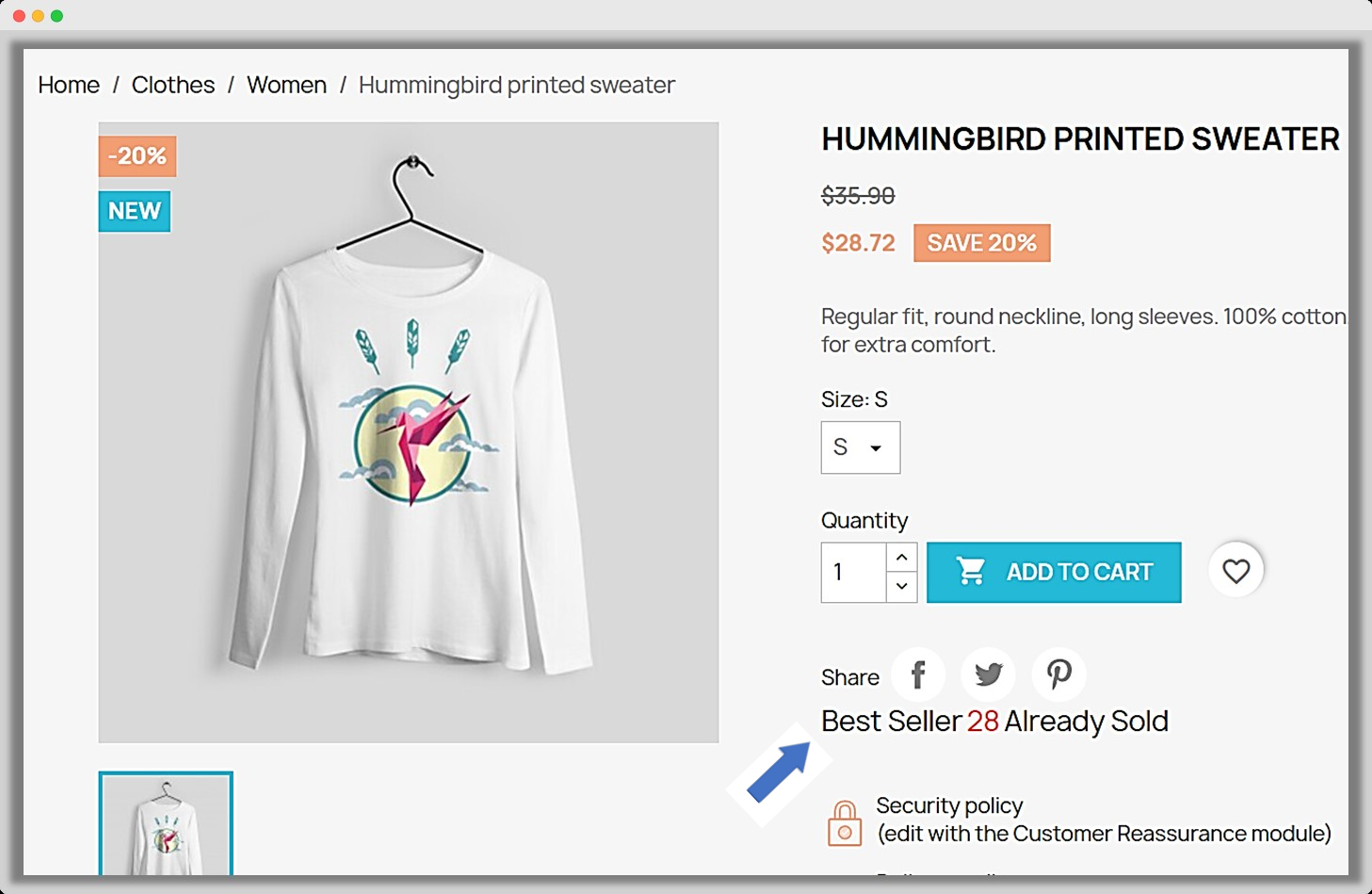
Informing customers of the items sold for a particular product is a great way to grab their attention and influence them to shop. You can build trust by letting customers know of the high number of sales for a particular product so they feel more comfortable in making a purchase.
If you wish to add the counter with desired items, using the Product Sold Counter module will save you a lot of time. The module helps to quickly customize the counter and show it on desired pages, to desired user roles. You can fully customize the counter to make it appealing and prominent.
Maximize Visibility by Displaying the Counter on Product & Listing Pages
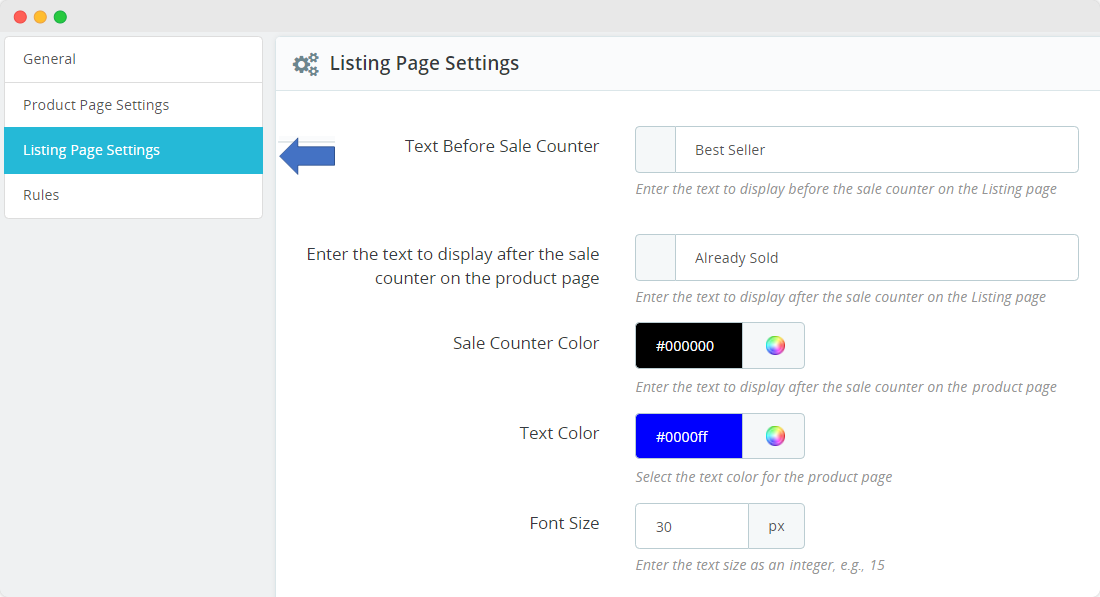
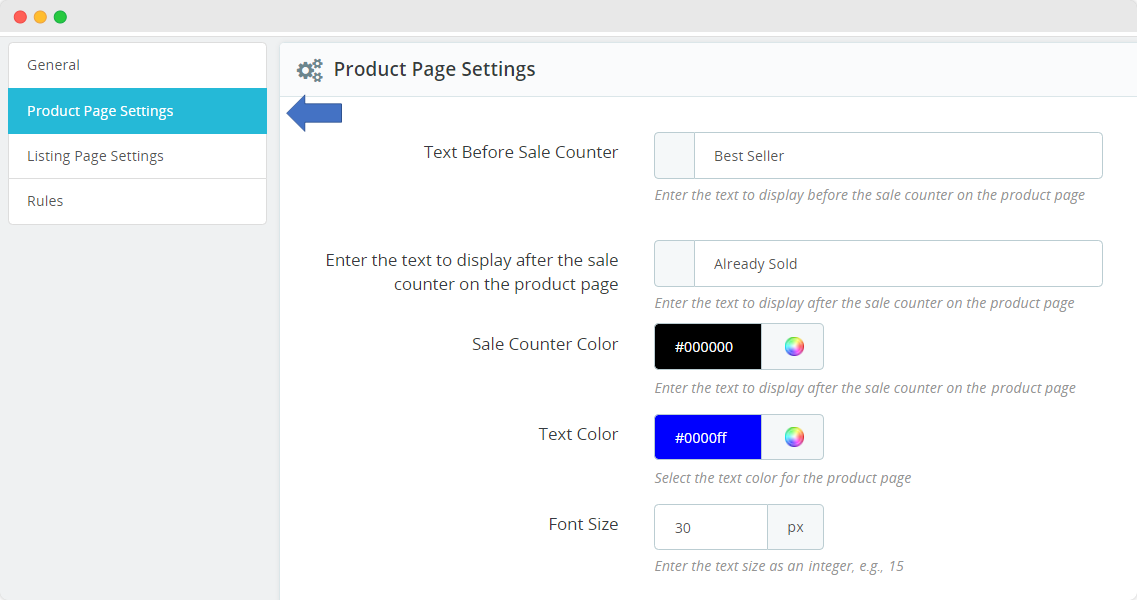
Maximize visibility by displaying the sales counter on product and listing pages. You have the flexibility to show the counter on either page or both, enhancing its reach and effectiveness. Each page can have its own uniquely customized counter, allowing you to tailor the design separately, ensuring the counter aligns with the layout and branding on both product and listing pages. This way, the sales counter not only grabs attention but also seamlessly fits your store’s overall look.
Specify the Number of Sales of a Product to Trigger Sales Counter
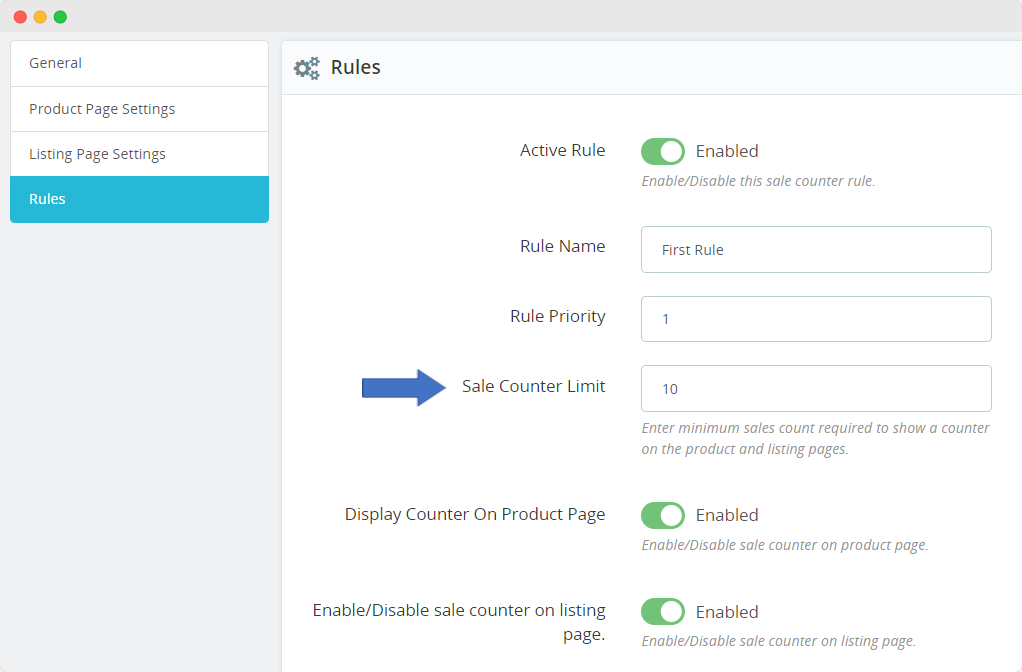
You can make the sales counter more effective by setting a limit on the number of sales required to activate it. For example, if you set the threshold to 10, the counter will only display products that have sold 10 or more units. This strategy can help highlight popular items that are most likely to grab customer’s attention.
Show Counter to Desired Customers on Desired Products for Targeted Reach
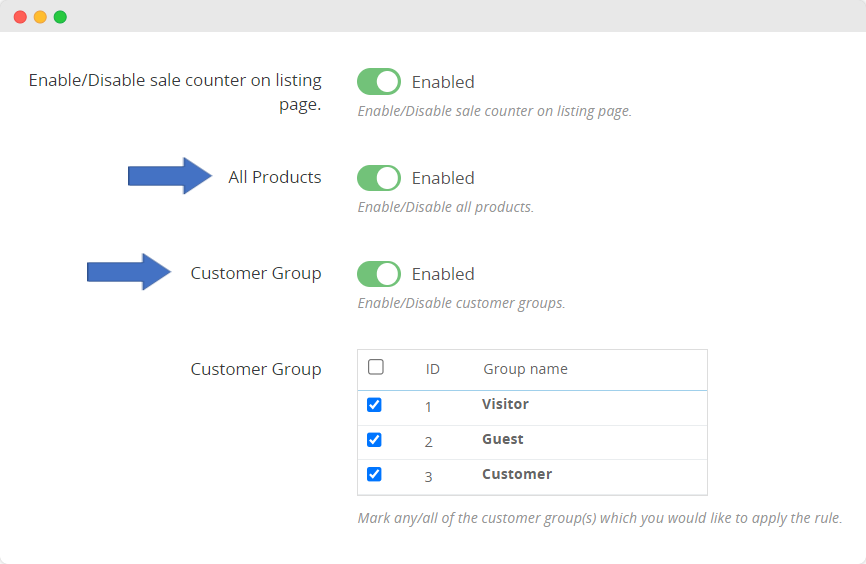
You can choose to show the sales counter on all or desired products. If you want to raise sales for specific items, you can enable the counter for those products only. Furthermore, to target specific audiences, you can show sales counters to specific customer groups, e.g., guest users, B2B customers, VIP customers, etc.
Raise Visual Appeal by Fully Customizing the Sales Counter
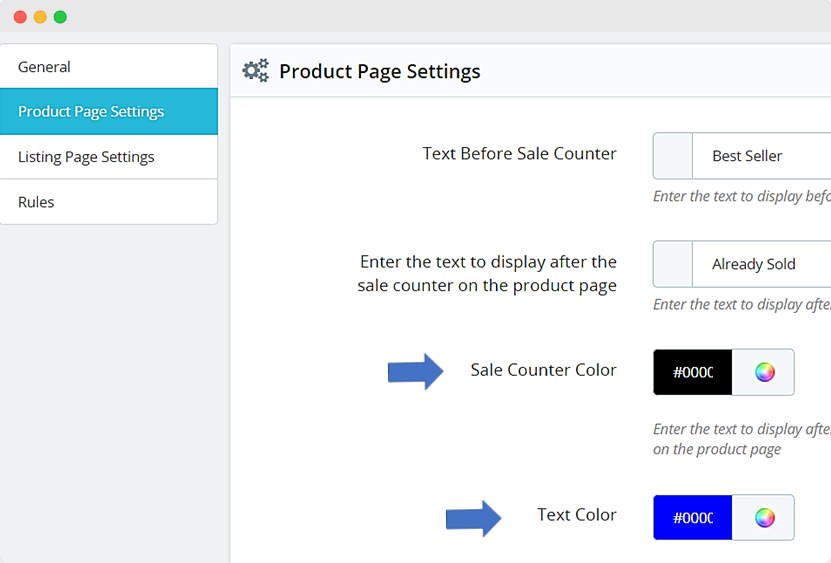
Enhance the visual appeal of your sales counter with full customization options. Tailor the counter to fit your store’s style by adjusting the text, font size, and color schemes. You can also add custom text before and after the counter, drawing users’ attention and making the counter more engaging. This level of customization allows you to create a visually striking counter that complements your brand and boosts customer interest.
Technical Compatibility
- PrestaShop CompatibilityV1.7.0.0 - V9.0.0
- Current VersionV 1.3.0
- Compatibility MultiShopYes
- Languages English, German, Italian, French, Spanish, Dutch, Polish and Portuguese
More Features
- Display a sales counter to indicate the number of products sold
- Enable counter on product & listing page
- Apply on all or specific products and categories
- Customize the counter for the product and listing pages:
-
- Add text before the sale counter
- Add text after the sale counter
- Choose a sale counter color
- Choose text color
- Select font size
- Add a limit required to show a counter on the product & listing pages
- Choose customer groups to show the sales counter
- Create multiple sale counter rules and choose the following:
- Activate rule
- Add rule name
- Set priority
- Schedule the sale counter rule by adjusting the following:
- Start date
- End date
Customer reviews
- The problem with product sold counters is that they are automated and only show online sales generated but with the help of prestashop product sold count module now I can sho the sales I make on my physical store.
- The best feature of prestashop product sold count module is the customization it offers of product sold counter.
- Prestashop product sold count module increased my sales by 26% beacause of the perception that if the product is sold more than its good quality
- Installed prestashop product sold count module a month ago and it works without any issue, recommended.
- Having the ability to set minimum quantity of products sold so when the sales pass the threshold level only then the counter shows, is phenominal. Prestashop product sold count module is just amazing
Be the first to get an exclusive offer and the latest news.
Martha Wells –
Having the ability to set minimum quantity of products sold so when the sales pass the threshold level only then the counter shows, is phenominal. Prestashop product sold count module is just amazing
Anthony Matthers –
Installed prestashop product sold count module a month ago and it works without any issue, recommended.
Phil Martial –
Prestashop product sold count module increased my sales by 26% beacause of the perception that if the product is sold more than its good quality
Brad Holmes –
The best feature of prestashop product sold count module is the customization it offers of product sold counter.
Mike Ronchi –
The problem with product sold counters is that they are automated and only show online sales generated but with the help of prestashop product sold count module now I can sho the sales I make on my physical store.