What does this module do?
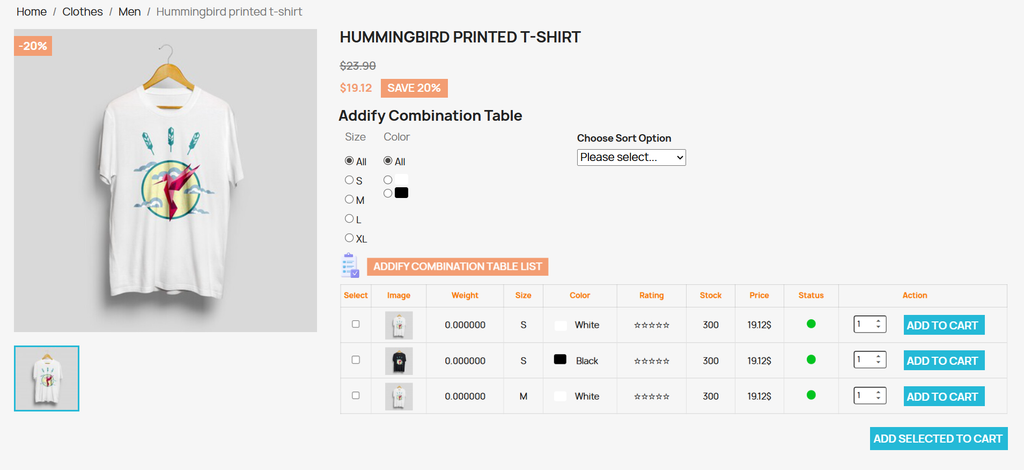
The PrestaShop Product Combinations Table displays product variations in a clear, structured, and customizable table with built-in filters. Features like sorting and bulk Add to Cart streamline the ordering process and enhance the overall user experience. By presenting all available combinations in an organized table, customers can easily compare options, check stock availability, and quickly add multiple items to their cart.
Features
- Exclude out-of-stock combinations
- Create and manage multiple combination tables
- Show the combination table as a default or pop-up
- Enable the add to cart button with text or icon
- Bulk add to cart for multiple combinations
- Activate the advanced combination filter
Customization Options
- Show or hide table heading with a custom title or text
- Style the heading with a custom color and icons
- Choose heading alignment (left, centre, or right)
- Select which columns to display in the table ( image, SKU codes, stock, price, attributes, quantity, and ratings)
- Personalize add to cart button color and icon/text color
- Control the add to cart button design
- Adjust table text color and column title color
- Choose where the table displays on the product page
- Display filters based on selected attributes
- Choose filter style ( radio, drop-down, multi-select)