Resell Request Form Fields
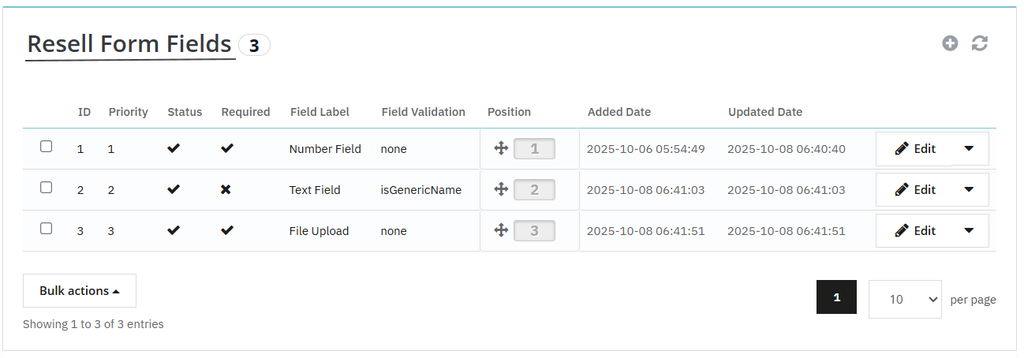
To create custom fields on resell request form, click on “Resell Form Fields”. Here, you can create unlimited rules and collect necessary details from the customers.
Creating New Resell Request Form Field
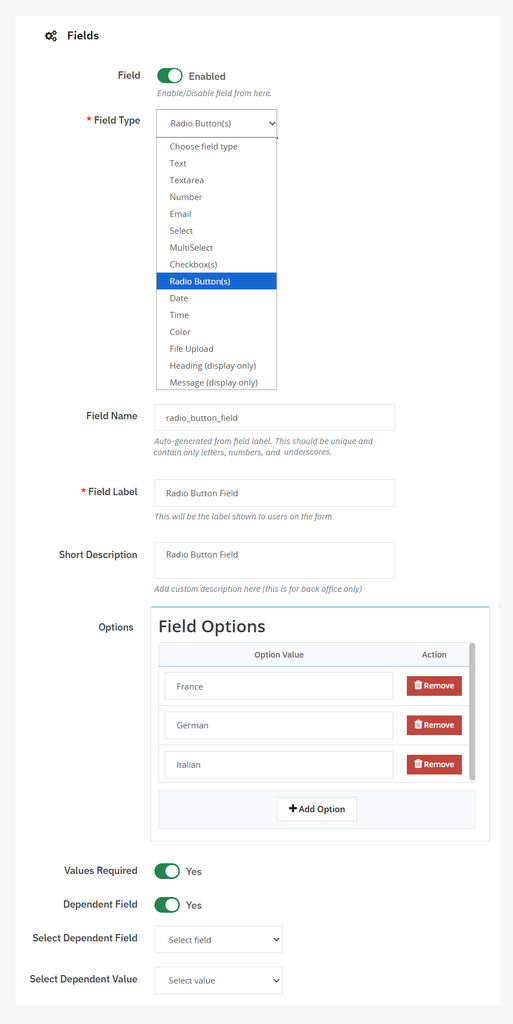
Click on “+” to add a new rule and follow the steps mentioned below:
- Enable the field option
- Add field type: From the dropdown, you can select field type as:
- Text
- Teaxtare
- Number
- Select
- Multiselect
- Checkbox
- Radio button
- Date
- Time
- Color
- File upload
- Heading
- Message
- Field Name: Add custom field name. It should be unique and must contain letters, numbers, and underscores.
- Write field label
- Add custom description
- Add placeholder to guide users about the field
- Values Required: choose to make this field required or optional for users
- Dependent Field: enable the option to make field dependable, and from the dropdown select:
- Dependant field
- Dependent value