
Setting Custom URL’s for a Specific User Role
To set specific URLs for a specific user role to redirect after registration, login, and logout using the “WooCommerce Redirect After Registration, Login, and Logout” plugin, follow these steps:
Make sure you have installed and activated the “WooCommerce Redirect After Registration, Login, and Logout” plugin on your WordPress site.
Configure Redirect After Login:
To set a custom URL for a specific user role after login, follow these steps:
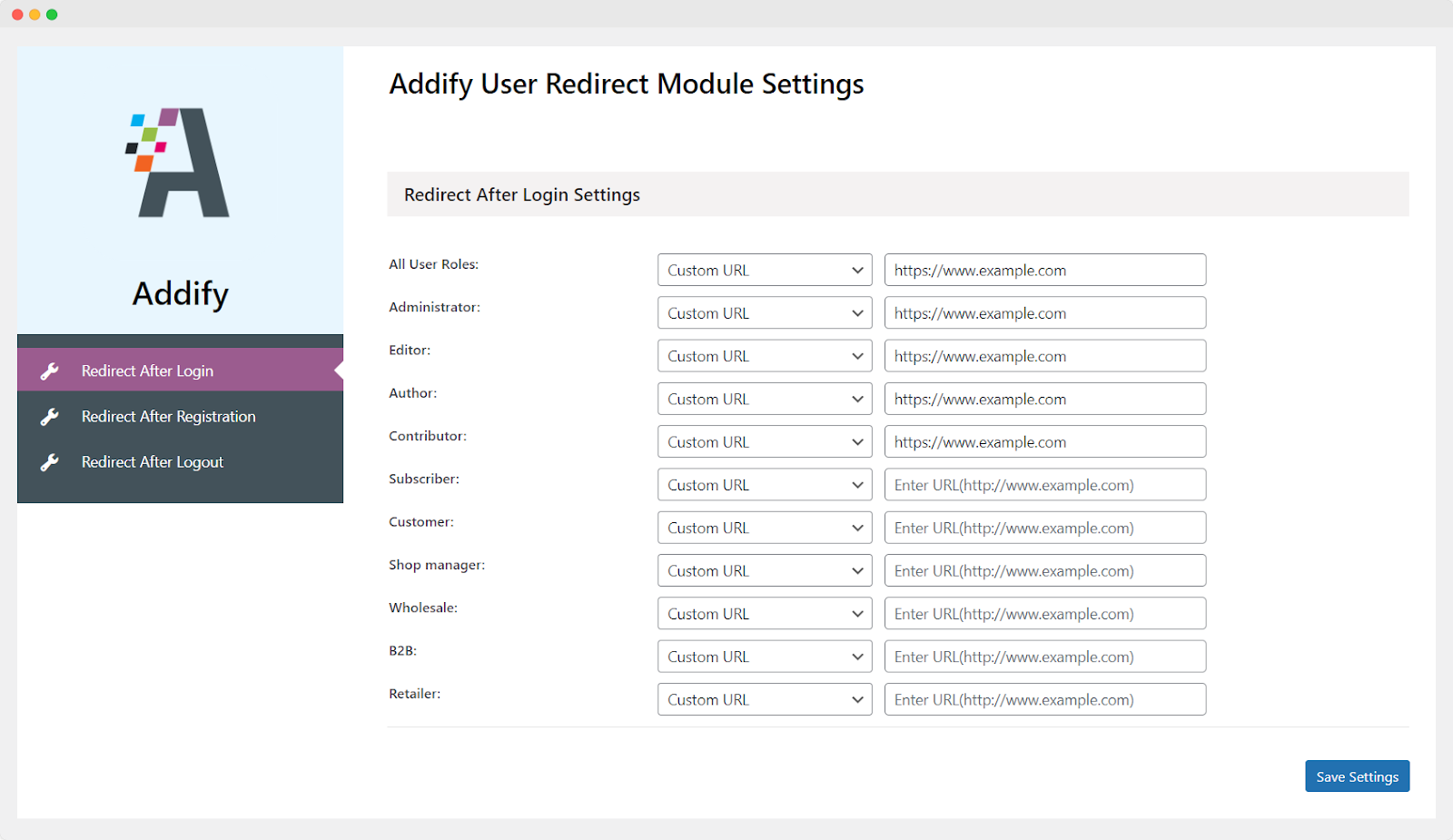
Go to your WordPress dashboard and navigate to WooCommerce > User Redirect > Redirect After Login Settings.
In the settings, you will see a list of user roles, including Administrator, Editor, Author, Contributor, Subscriber, Customer, Shop Manager, Wholesale, B2B, Retailer.
Choose the user role for which you want to set a custom redirection URL.
In the “Redirection Page” dropdown, select “Custom URL.”
A new field will appear where you can enter the specific URL to which you want users with that role to be redirected after login.
Save your changes.
Configure Redirect After Registration:
To set a custom URL for a specific user role after registration, you can follow similar steps in the plugin’s settings.
Look for the “Redirect After Registration” section within the plugin’s settings.
Select the user role (e.g., Subscriber, Customer, etc.) for which you want to set up custom redirection after registration.
Choose “Custom URL” in the “Redirection Page” dropdown.
Enter the specific URL where you want users with that role to be redirected after registration.
Save your changes.

Configure Redirect After Logout:
Unfortunately, as mentioned, the plugin may not support redirecting to the previous page after logout due to technological limitations. However, you can still set up a custom URL for a specific user role after logout. Here’s how:
In the plugin’s settings, find the “Redirect After Logout” section.
Select the user role for which you want to configure the logout redirection.
Choose “Custom URL” in the “Redirection Page” dropdown.
Enter the specific URL where you want users with that role to be redirected after logout.
Save your changes.

After following these steps, users with the specified roles will be redirected to the custom URLs you’ve set after registration, login, and logout. Make sure to save your changes in the plugin settings for them to take effect.