


Product Compare For WooCommerce
Product Compare for WooCommerce allows users to compare products effortlessly with AJAX-based fast comparison and customizable button positioning. The plugin supports user role-specific access, making it perfect for different customer groups. The popups, attribute support, and category filtering enhance the user experience, while the style settings let you tailor the interface to match your store’s theme.
Key Features
- Enable/disable product comparison on your store
- Restrict product comparison for selected user roles
- Provides AJAX-based fast comparison
- Add custom compare buttons on your store
- Use a short code to create a dedicated compare page

Compatible with WooCommerce Version 3.5.0 or Higher | WordPress Version 4.0.0 or Higher
-
Extension Partner
-
$2.42/month
Billed annually at $29 / year
- 1 year free support
- 1 year extension updates
30 DAYS MONEY BACK GUARANTEE
Your money is secure with our buyer protection. Claim a full refund for any reason.
Features of Product Compare For WooCommerce
Enable Product Comparison on Your Store
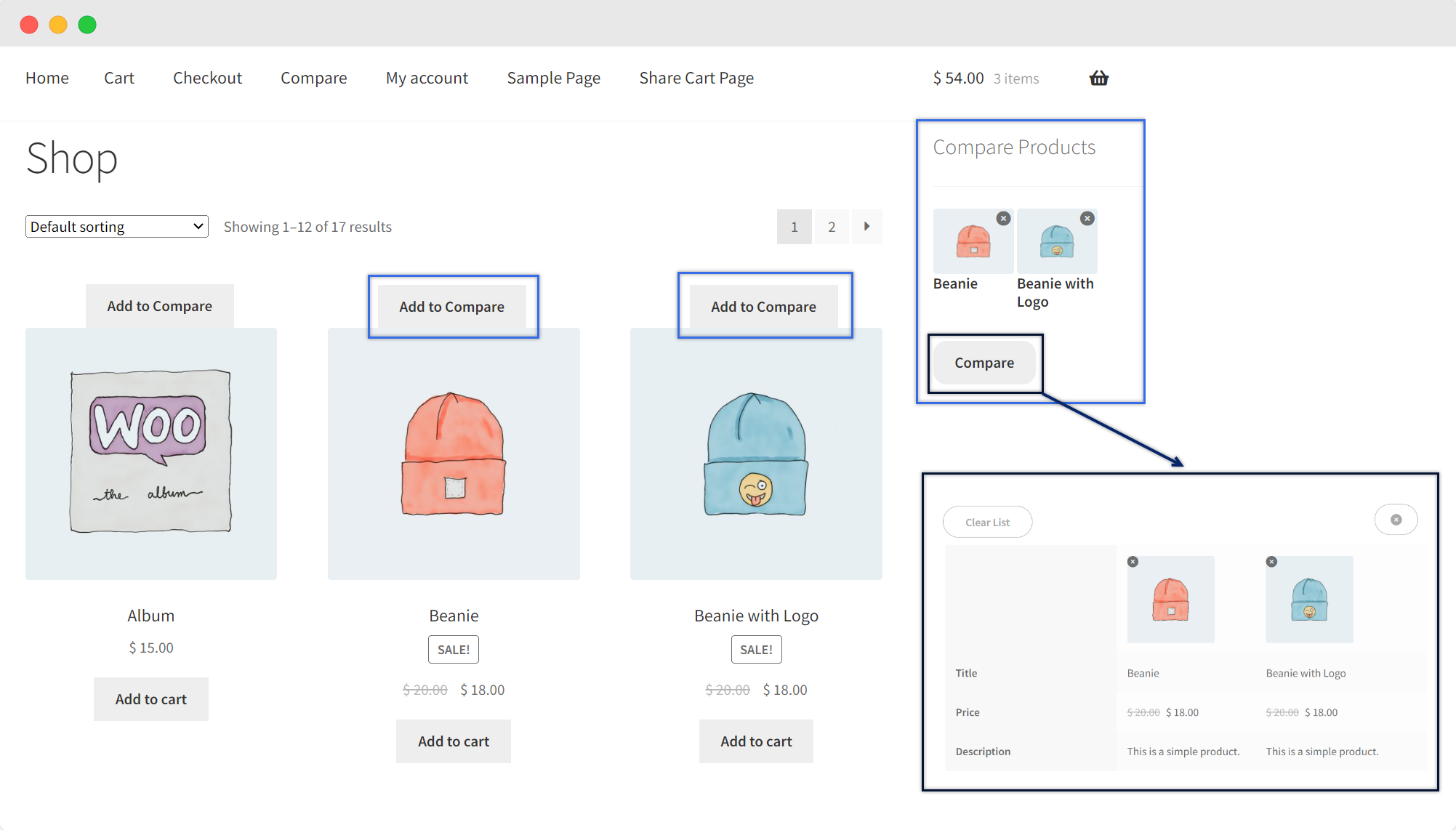
Introduce a powerful product comparison feature that enhances the shopping experience for your customers. Upon activation, users gain the ability to easily compare products side by side, aiding their decision-making process.
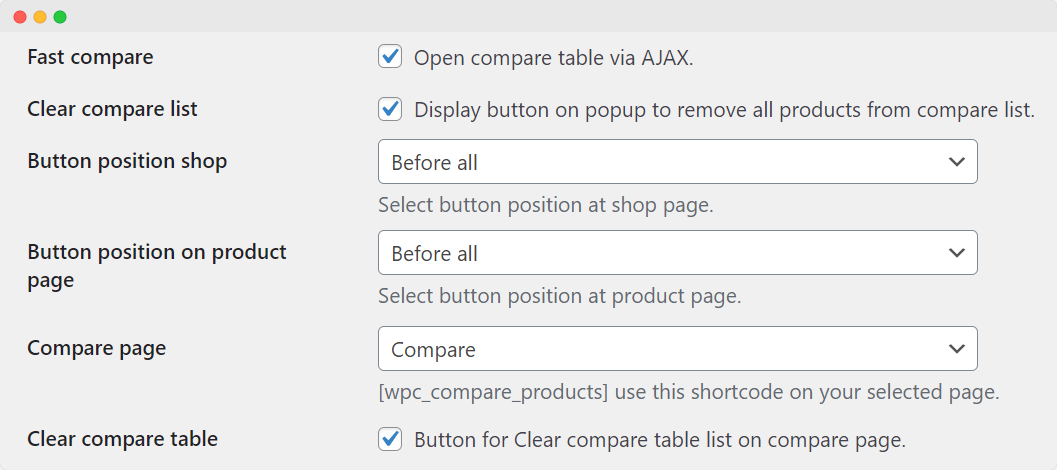
The “Fast compare” option ensures that the comparison table opens via AJAX, providing a seamless and swift comparison process without needing page reloads.
The “Clear compare list” feature adds convenience for users by displaying a button within the comparison popup. With this, you enable visitors to remove all products from their comparison list at once.
Advanced Restriction Options for Product Comparison
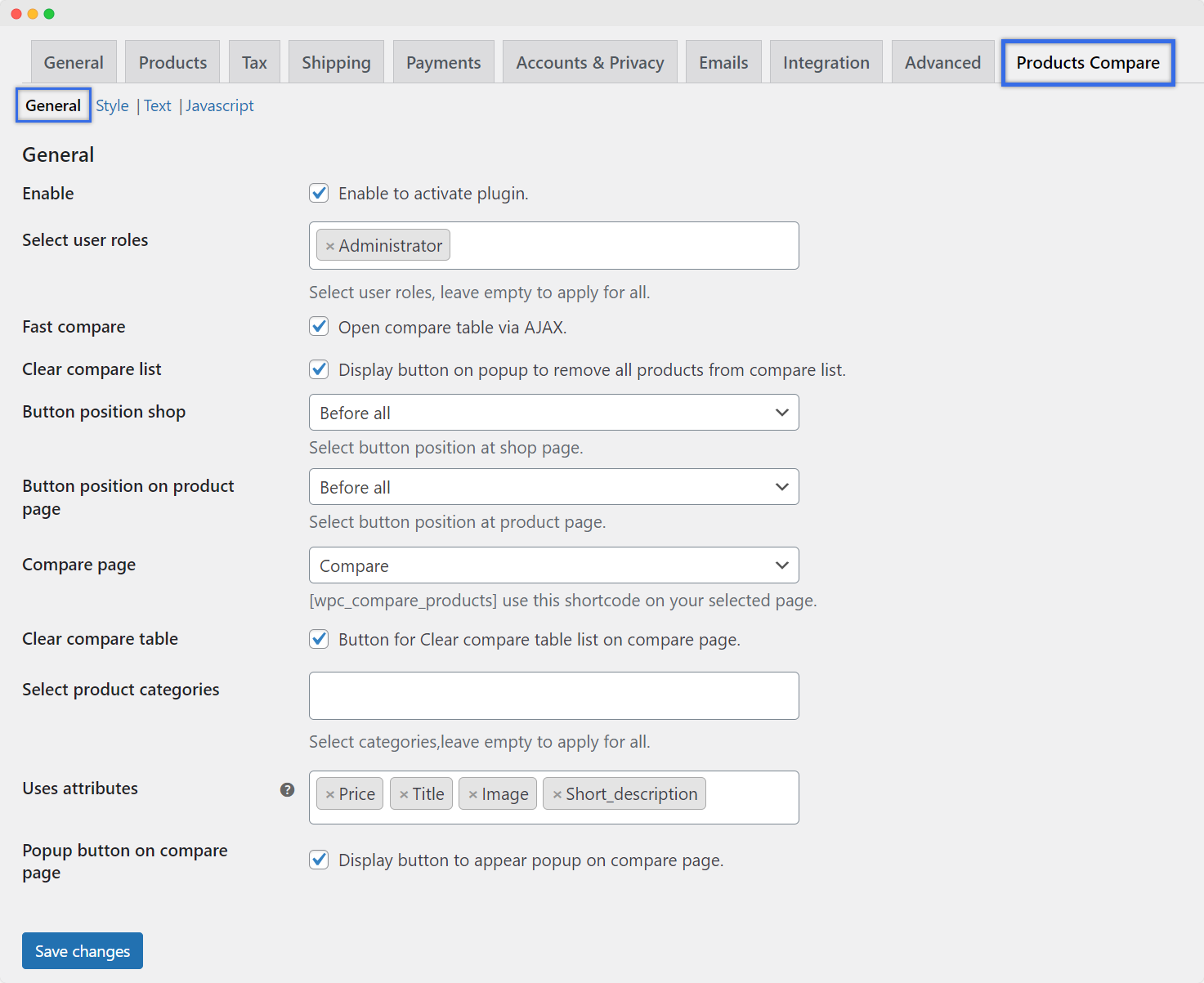
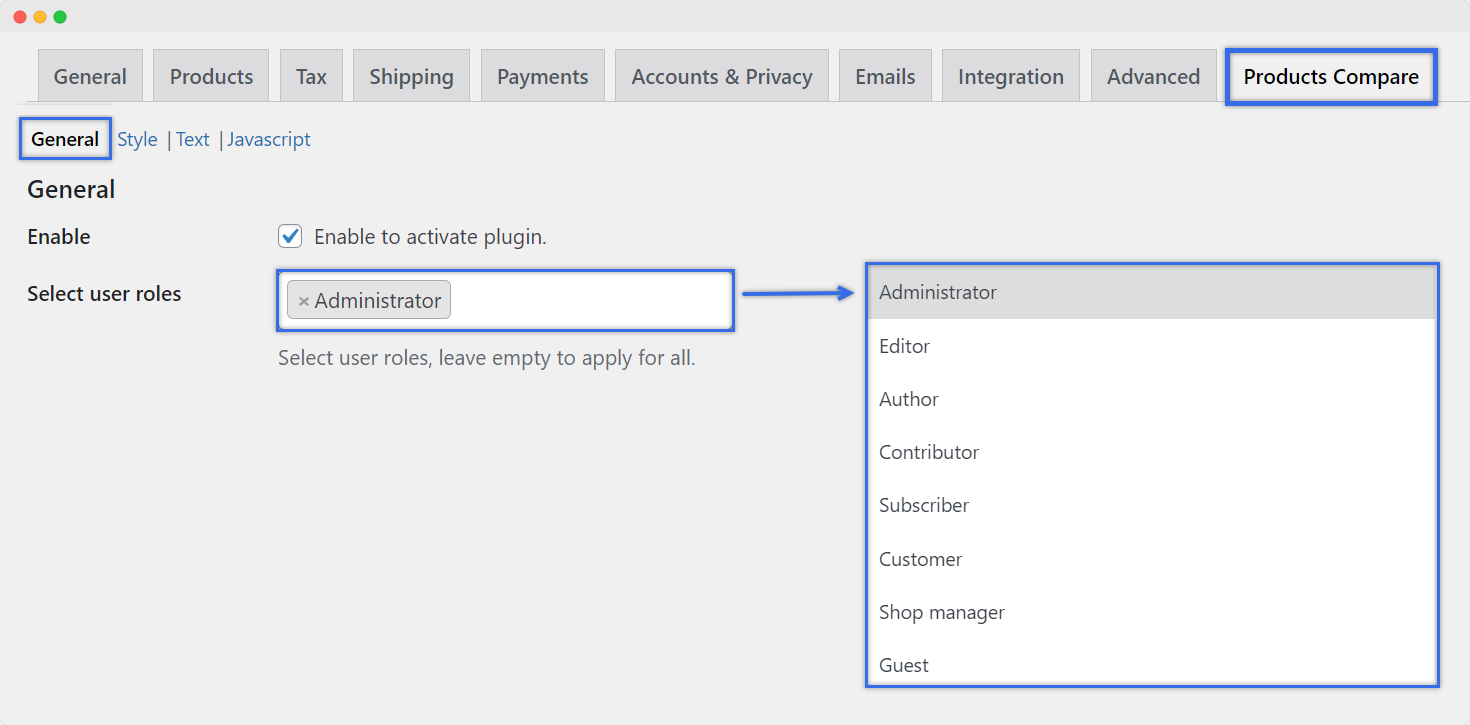
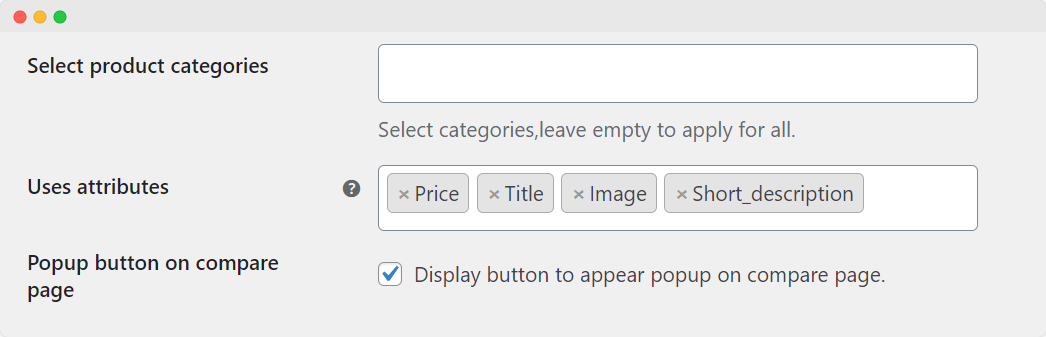
WooCommerce Product Compare Plugin offers powerful options for restricting product comparison based on user roles, product categories, and user attributes. Choose specific user roles to determine who can access the product comparison feature.
You can apply product category restrictions by selecting specific categories for which the product comparison will be enabled. The plugin also supports the use of product attributes for comparison. You can select particular attributes (like size, color, material, etc., that you have defined for your product) that will be considered during the comparison process.
Position the Buttons on Your Store
With the WooCommerce Product Compare Plugin, you have the flexibility to position the comparison buttons at various locations on your store’s shop and product pages. You can choose from the following location options:
- Before All
- After Image
- After Title
- After Price
- After Add to Cart Button
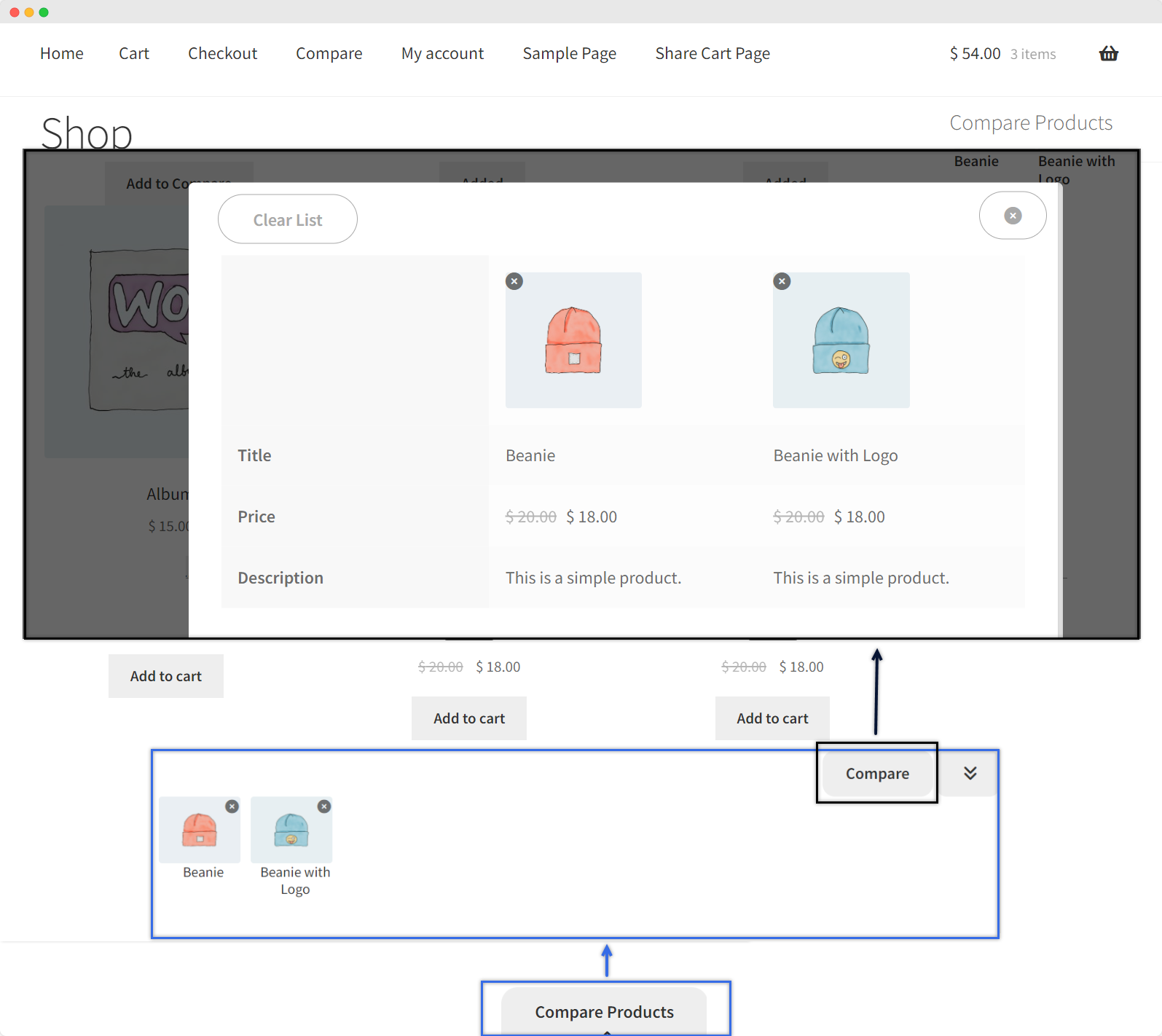
You also have the option to display a button on the compare page, which, when clicked, opens the comparison popup. This makes it easier for users to access and manage their selected products for comparison on the dedicated compare page.
Add Custom Text on Buttons
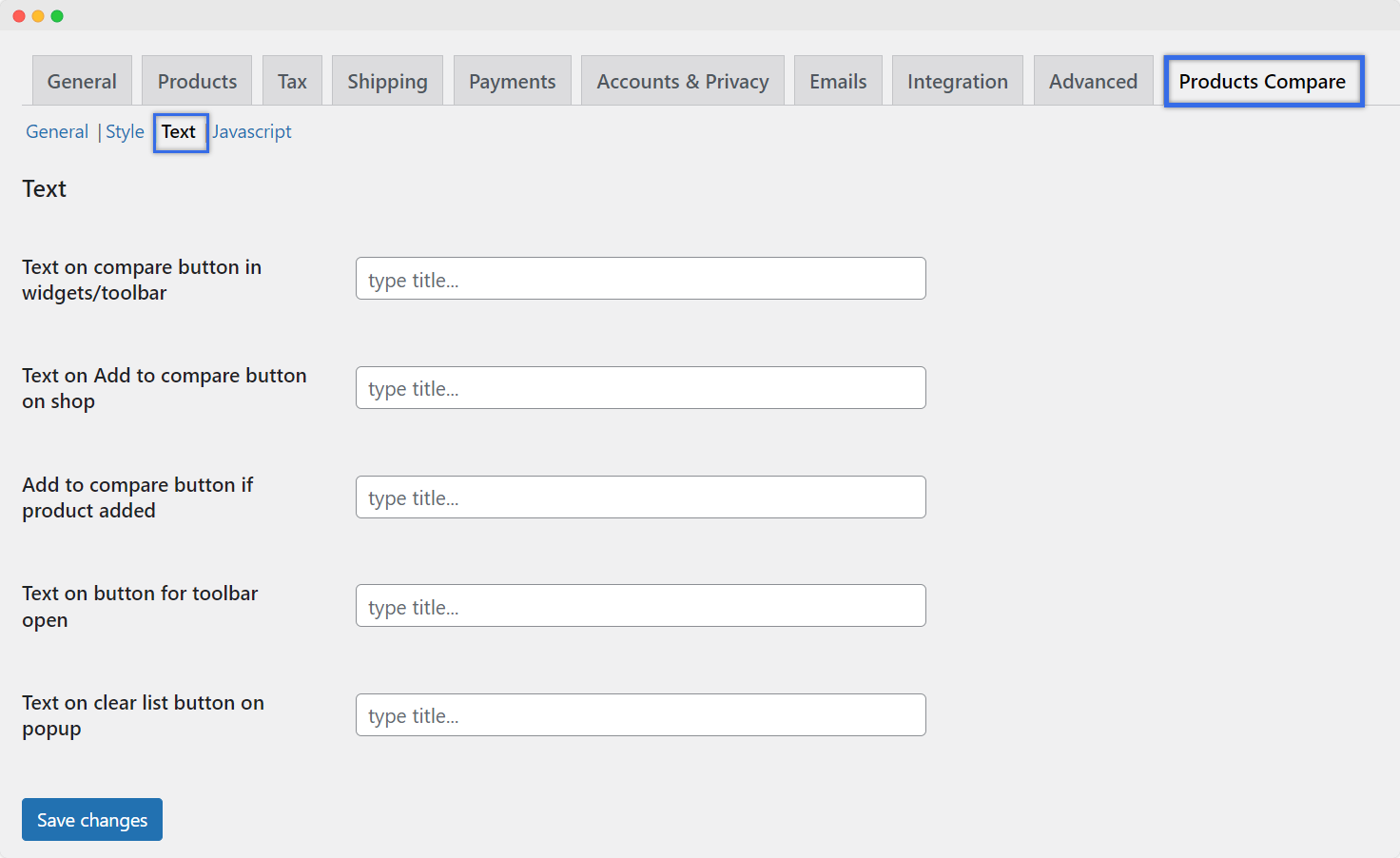
In the Text Settings section of the WooCommerce Product Compare Plugin, you have the ability to customize various texts that appear throughout the comparison feature. You can define a custom text for the following buttons that appear on your store:
- Text on Compare Button in Widgets/Toolbar
- Text on the “Add to Compare” Button on the Shop
- Text for Added Product in Compare List
- Text on Toolbar Open Button
- Text on Clear List Button on Popup
These customizable text options ensure a seamless and user-friendly comparison experience on your WooCommerce store, aligned with your store’s unique style and messaging
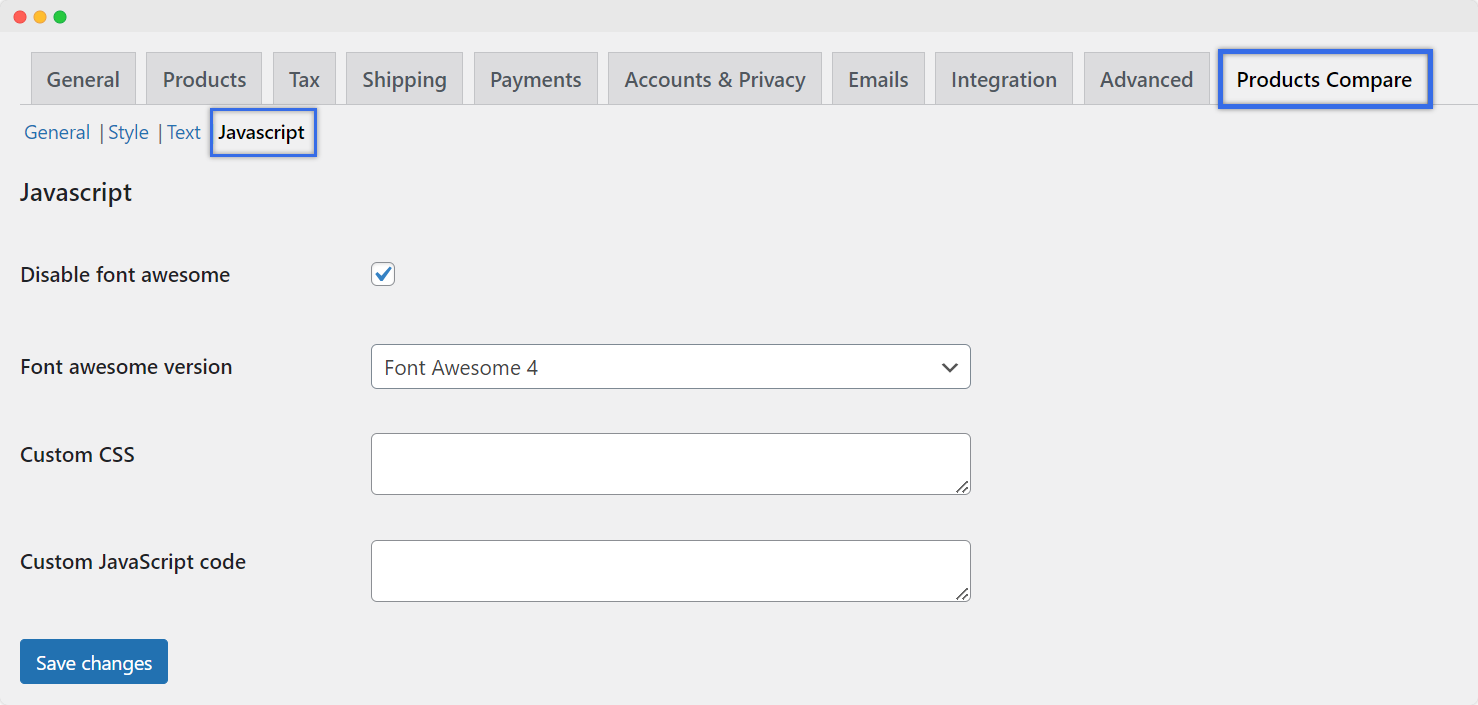
Configure JavaScript Settings
Choose to disable Font Awesome icons if you prefer not to use them in the plugin’s interface. If left unchecked, you can specify the version used (Font Awesome 4 or Font Awesome 5) to ensure consistent and compatible icon display across the plugin.
Take advantage of the plugin’s custom CSS and JavaScript fields to tailor the appearance and functionality to your unique requirements, allowing you to modify styles and behaviors as needed.
Technical Compatibility
- Version1.0.0View changelog
- WordPress Version Required4.0.0 or Higher
- WooCommerce Version Required3.5.0 or Higher
- Multi-Site SupportYes
- LanguagesEnglish
- WPML CompatibilityWPML Supported
- TranslatableYes, Translation Ready
- CountriesWorldwide
More Features
- Option to clear the compare list with a button displayed on the popup
- Position the “Add to Compare” button on the shop page and individual product pages:
- Before All
- After Image
- After Title
- After Price
- After Add to Cart Button
- Display button to clear compare table list on the compare page
- Allow product comparison based on
- Product
- Categories
- Attributes
- Show the popup button on the compare page
- Configure styling options for buttons, tables, and popups
- Choose to disable Font Awesome icons
- Specify the version of Font Awesome for consistent icon display
- Insert custom CSS and JavaScript code
- Customize style settings based on your store’s theme for:
- Widgets Compare Button
- Toolbar Compare Button
- Toolbar Open Button
- Popup Table
- Compare Page Table
- Cross Button on Popup
- Popup Clear List Button
- Compare Page Clear List Button
- “Add to Compare” Button
- Define custom text for various elements, including:
- Text on Compare Button in Widgets/toolbar
- Text on Add to Compare Button on Shop
- Add to Compare Button if Product Added
- Text on Button for Toolbar Open
- Text on Clear List Button on Popup
Customer reviews
- My customers like the comparison feature, and it's simple to manage
- I really appreciate the quick comparison feature.
- The plugin is easy to use and works great and adding product comparison has really made my store better. Customers really like it
- it works well
- This plugin is great for any store. It has custom buttons and a comparison page that make things simple.
- Great Plugin with Excellent Support
Be the first to get an exclusive offer and the latest news.
Shady Tree –
Impressive features
Rhoda Report –
The comparison feature works really quick and efficient because of the AJAX technology. My website stays fast and responsive.
Anne Ortha –
I highly recommend this plugin for anyone using a WooCommerce store. It has lots of features, it’s easy to use and it’s come with excellent support.
John Dory –
The interface is very easy to use, and the comparison feature is quick and simple. It has definitely made our store more user-friendly.
Brooks Wells –
I have used this plugin for my store, and it’s been very helpful. I Highly recommend this plugin beaucse of it great features.
Javon Bailey –
This plugin makes it super easy and fast to compare products.
Elliot Woods –
This plugin works really well on my site. The quick comparison feature is fast and easy to use. It has been a great addition to my store.
Erick Hughes –
The plugin works well and has a lot of useful features and very satisfied.
Myla Johns –
This plugin is highly customizable and easy to use. I’m really impressed with ability of this plugin.
Sam Kennedy –
This plugin is Very easy to customize and set up.
Taylor Morley –
This Plugin Works well, highly recommended!
Carlos D. Burriss –
The plugin is very easy to use and Customers can easily compare features, and I really like the customizable button texts. I highly recommend it!
Mackenzie Hannam –
I really like this plugin. It’s simple to set up and works perfectly for our store.
Leo Arthur –
Had some issues with store front button placement and appearance but the support was quick to respond and solve my issue. Great product overall.
Paul Christian –
This plugin is perfect for comparing products. It’s user-friendly works well with my store and the quick comparison feature is really impressive.
Jalen Beier –
I am so satisfied with this plugin. It’s amazing, works perfectly out of the box, and I’ve never had any issues using it. Thanks for such a good product!
Jerry Harmon –
It works as expected. The support is excellent, with quick responses. There is some room for improvement in customization options.
Olive Yew –
Excellent features and very responsive support.
Allen Anderson –
Great Plugin and easy to Use. This plugin has made it much easier for my customers to compare products. The fast loading and customizable features are perfect for my store’s requirements.
Jose Purdy –
This plugin has everything I need. It’s simple to set up, customizable, and works without any issues. The AJAX-based comparison feature is very helpful.
Jayce Conn –
Great Plugin with Excellent Support
Dustin Trailblazer –
This plugin is great for any store. It has custom buttons and a comparison page that make things simple.
Jenny Flex –
it works well
Brando Conroy –
The plugin is easy to use and works great and adding product comparison has really made my store better. Customers really like it
Hudson Kutch –
I really appreciate the quick comparison feature.
Matt Goldner –
My customers like the comparison feature, and it’s simple to manage