Configure General Settings for Image Generation
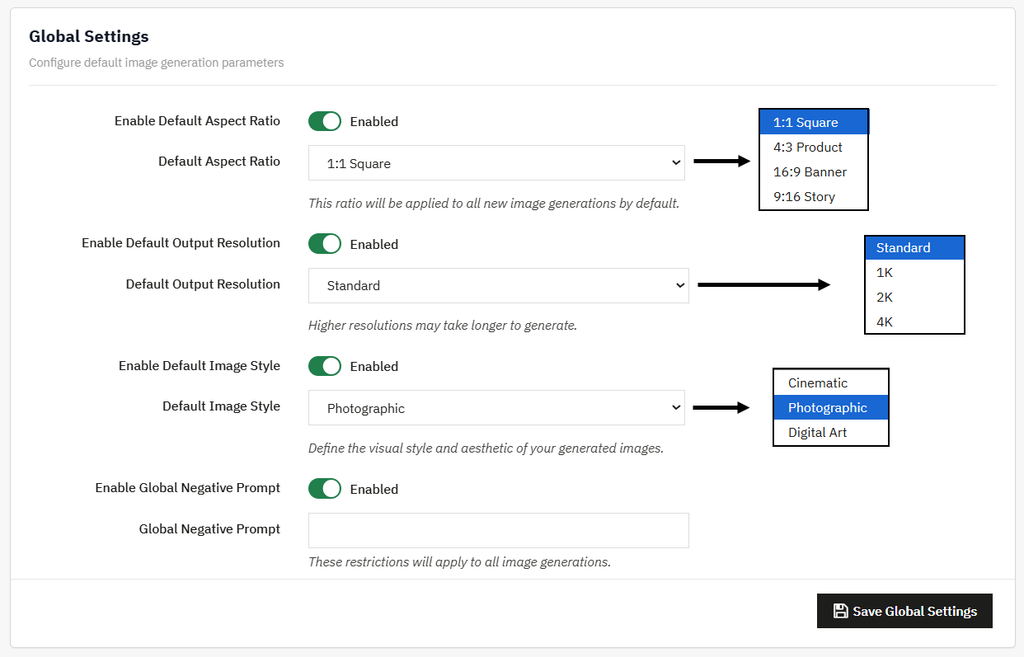
To set the default aspect ratio for AI-powered images, you can use PrestaShop AI Product Image Generator Module. You can install the module within minutes. Once installed, go to Modules> Module Manager > Addify AI Product Image Generator and select Configure. Now, from the side menu, select Global Settings, and from this section, you can add the desired default aspect ratio and resolution for the images. For a detailed explanation, follow these steps:
- Install the module, go to Modules > Module Manager > Addify AI Product Image Generator, and select Configure.
- Now, from the side menu, select Global settings and choose the default aspect ratio for the images as:
- 1.1 Square
- 4.3 Product
- 16.9 Banner
- 9.16 Story
- Add default output resolution as standard, 1K, 2K, or 4K. You can also set image style as:
- Cinematic
- Photographic
- Digital Art
- Set the global negative prompt and click save.