
Applying Pricing Rules at the Product Level
To apply pricing rules at the product level and specify countries using the WooCommerce Price by Country plugin, follow these steps:
Install and Activate the Plugin: Begin by installing and activating the WooCommerce Price by Country plugin on your WordPress website.
Access Product Settings: Navigate to the “Products” section in the WordPress Admin Panel. Here, you can either create a new product or edit an existing one.
Edit Product Details: Once you’re in the product editing page, locate the “Product Data” section.

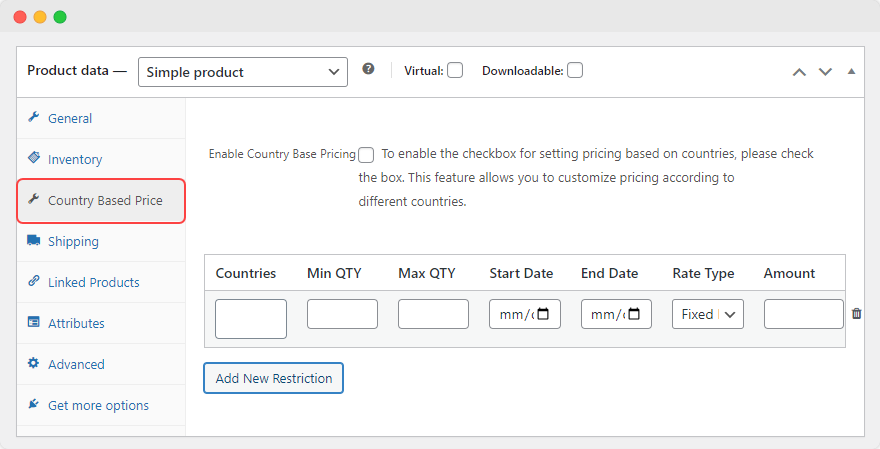
Set Pricing Rules: Within the “Product Data” section, find the option labeled “Price by Country” and click on it. This will allow you to set pricing rules specific to different countries for this particular product.
Create Restrictions for the Pricing Rule:
Click on “Add New Restriction”.
- Countries: Choose the countries where you want the pricing rule to be applied. You can select one or multiple countries.
- Schedule Rule: Choose to enable the rule for a desired period by adding the start and end times.
- Quantity Limit: Limit product quantity by adding min and max quantity of product.
- Rate Type: Select the type of rate adjustment you want to apply:
- Increase by Fixed Amount: Add a specific amount to the product’s price.
- Decrease by Fixed Amount: Subtract a specific amount from the product’s price.
- Increase by Percentage: Increase the product’s price by a certain percentage.
- Decrease by Percentage: Decrease the product’s price by a certain percentage.
- Fixed Price: Set a fixed price for the product, regardless of its original price.
- Amount: Enter the respective amount for the price adjustment based on the selected rate type.
Save Changes: Once you’ve filled out all the necessary details and set the pricing rules, click on “Publish” to save the changes to the product.
By following these steps, you can apply pricing rules at the product level and specify countries using the WooCommerce Price by Country plugin. This allows you to customize pricing for individual products based on the customer’s location, helping you tailor your pricing strategy to different markets and customer segments.