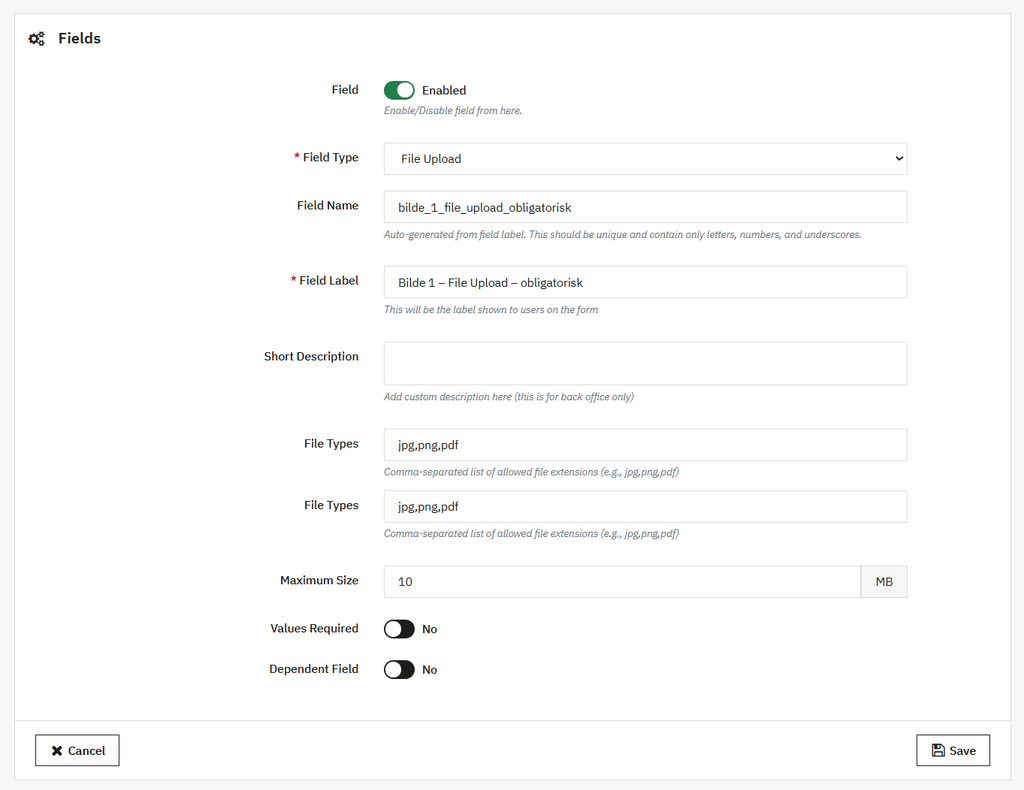
To add file upload or any other field on resell request forms, you can use the PrestaShop trade-in module. Once you have activated the module go to its general settings and enable the “Resell Old Products” button. Set its position, font size, and appearance according to your needs. Now, from the side menu, click Resell Form Fields. Here you can create unlimited rules and add custom fields like text, textarea, select, checkbox, radio button, and more. For detailed overview, follow the steps mentioned below:
1. Install the module and go to its general settings. Enable Resell Product request button, choose to display it on product or account page. Then add its position and font family.
2. Once you have customized the button, go to resell request forms and enable the option. Add title, description, and success messages for the form.
3. Now, click on Resell Form Fields and from the dropdown select File Upload. Add field name, label, description, and placeholder.
4. Choose to make this field required or optional and set other fields dependent on this one.
5. Click on save, and now you have successfully added the file upload option on resell request forms.