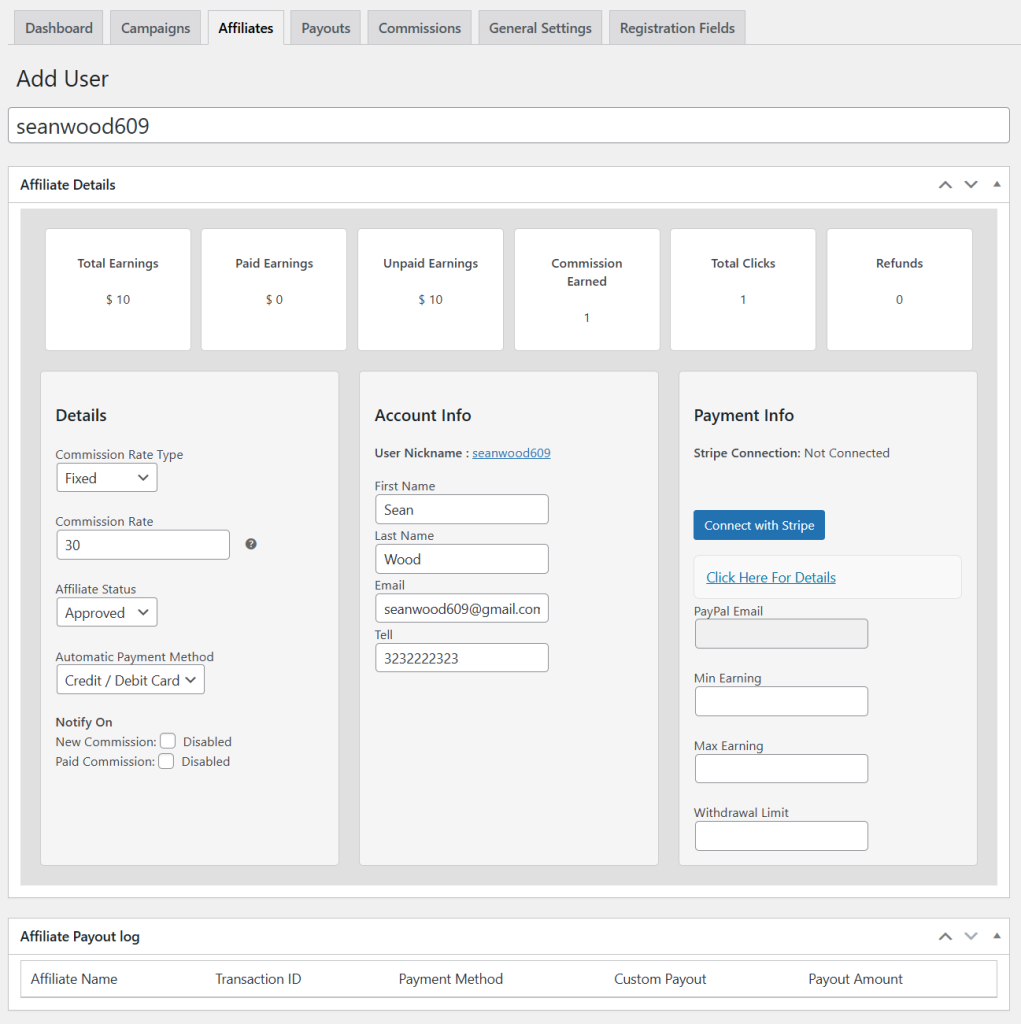
To add a new affiliate, you can use WooCommerce Affiliate Marketing extension. Go to WP Admin Panel > WooCommerce > Affiliates and select “Add User”.

- Now, add a custom title for the new user and track the following details:
- Total, Paid, and Unpaid earnings
- Commission Earned
- Total Clicks
- Refunds
- From the “Details” section, you need to add commission rate type as a fixed amount or percentage value. Then set a specific commission for the user and add the affiliate’s status as approved or suspended
- Select desired payment method and choose to notify users when the commission is paid or a new commission is added.
- From “Account Info,” you can add user’s basic information. Once added, navigate to “Payment Info” and specify their:
- PayPal Email
- Minimum Earning
- Maximum Earning
- Withdrawal Limit
- Now, scroll down to “Affiliate Payout Log” and track details like affiliate name, transaction ID, payment method, and custom payout amount.