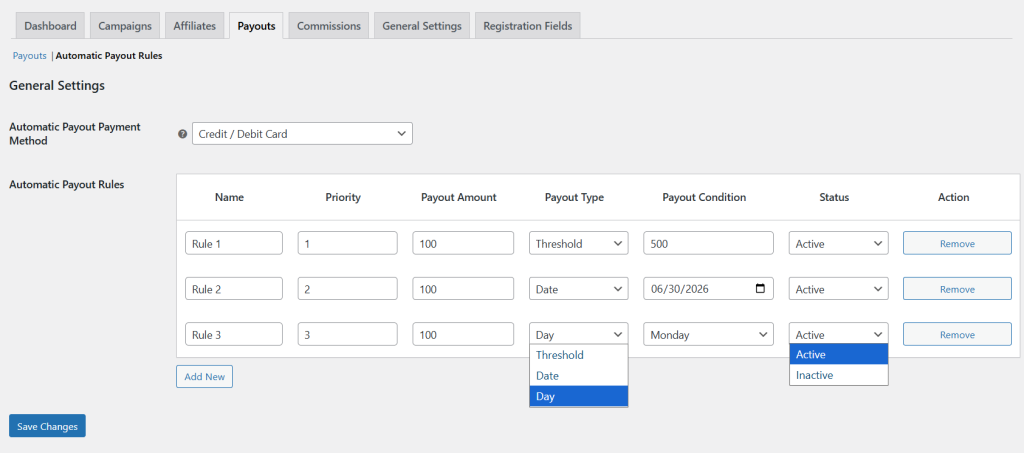
To set automatic payout rules, you can use WooCommerce Affiliate Marketing extension. Once installed, go to WP Admin Panel > WooCommerce > Affiliate > Payouts and click on “Automatic Payout Rules”.
- From the dropdown, select the payment method for the affiliate payouts. Note that only PayPal, Stripe, and Credit/Debit Cards are allowed.
- Now, from the table, select “Add New” and configure the name of the rule. You can set its priority and enter the specific commission to trigger payouts automatically.
- From Payout Type, you can choose to set automatic payouts based on:
- Threshold: Select this option if you want to set a specific amount that affiliates must reach before withdrawing their earnings.
- Date: Select this if you want to release payouts on specific dates
- Day: From this, you can choose any specific day on which payouts will be processed automatically
- According to the selected payout, define the required condition and set the status for the rule as active or inactive.
- Once you have created multiple payout rules, navigate to “Action” and select “Remove” to delete any rule at any time.