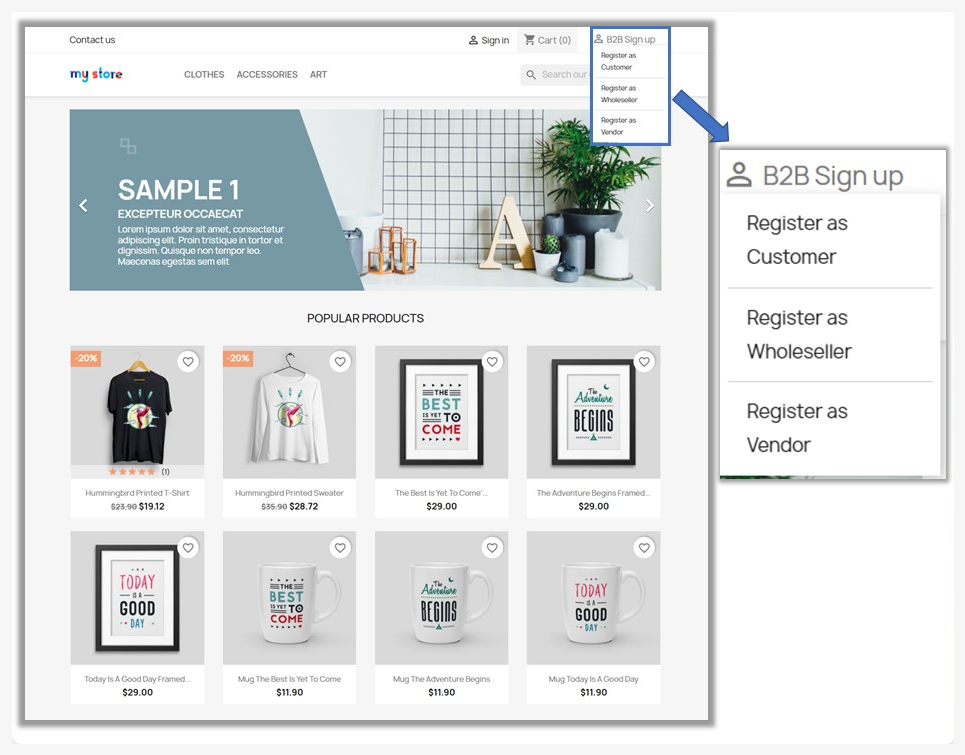
Overview of PrestaShop B2B Registration Form Builder
What does the module do
PrestaShop B2B Registration Form Builder allows you to create multiple custom registration forms with unlimited form fields specifically designed for business-to-business (B2B) customers. It provides advanced features like SIRET and VAT verification, ReCaptcha protection, and email notifications. You can design multiple registration forms with custom fields, enable automatic user approval, and assign users to specific groups upon registration. The module also supports layout customization and efficient management of new B2B customer registrations.
Features
This module provides a highly customizable and vigorous solution for managing B2B customer registrations in PrestaShop. The detailed features provided by the module are:
- Enable/Disable B2B registration for your store
- Option to disable default PrestaShop registration form
- Edit B2B customer information after registration
- Enable/Disable SIRET number and VAT verification during the registration process
- Option to add SIRET access token for verification
- Enable/Disable Google ReCaptcha for registration forms and add a site key
- Notify admin and shop managers about new registrations
- Send confirmation emails to customers after registration
- Create and manage multiple B2B registration forms
- Auto-approve new users or display a pending account message
- Option to create a dedicated CMS page for the registration form
- Assign users to specific groups (Visitor, Guest, Customer) after approval
- Enable/Disable optional fields in the default registration form
- Allow specific fields for the default and B2B registration form and make them required
- Create unlimited custom fields for the registration form using 15 field types
- View and manage all new and pending B2B registrations
- Approve or disapprove registrations manually or in bulk
Customization Options
The module allows you to:
- Customize form group titles and assign priorities
- Customize form title, position, and field requirements for the default registration form
- Enable/Disable form display in top header navigation or login/signup page
- Customize button color, button text color, and text size
- Set placeholder text, required fields, and assign fields to groups for custom fields
- Manage custom fields from the log