🚨 Price Drop: Get B2B for WooCommerce for just $149 (was $179). Save $30 today!


B2B for WooCommerce
Trending
B2B for WooCommerce is an ultimate wholesale pack that allows you to efficiently optimize your store for both B2B and B2C customers. Why install dozens of plugins when you can get them all in a single package at a fraction of the price and save over $330. With WooCmmerce B2B extension, you can:
- B2B AI Assistant – Manage B2B extension-related operations with the help of AI Copilot
- Add New User Role – Add new user roles and edit their capabilities.
- Manage B2B Registrations – Customize registration form by adding new & editing default fields.
- Manage Product & Category Visibility – Hide certain products and categories from defined users.
- Manage Product Prices – Adjust and hide prices based on user roles.
- Manage Cart-Level Discount – Apply discounts based on cart amount and its content
- Add Quantity-Based Pricing – Apply tiered pricing on categories and products.
- Manage Quotation System – Accept quotes & convert to order using a customizable quotation form
- Manage Price & Add to cart visibility – Conceal price and add to cart for specific users.
- Manage Tax Visibility – Show prices including/excluding tax to certain roles.
- Offer Tax Exemption – Tax exempt certain customers based on VAT numbers & tax certificates.
- Restrict Payment/Shipping – Limit which payment/shipping methods apply to which users.
- Apply Order-Based Limitation – Restrict order amount and quantity based on user role

WooCommerce Marketplace Approved with Average Rating of 4.7 Trusted by 10,000+ Users. View Listing
-
Marketplace Verified
-
Extension Partner
-
-
15K+ Downloads
$79
$12.42/month
Billed annually at $179 Original price was: $179.$149Current price is: $149. / year
- 1 year free support
- 1 year extension updates
30 DAYS MONEY BACK GUARANTEE
Your money is secure with our buyer protection. Claim a full refund for any reason.

Features of WooCommerce B2B Plugin
Manage B2B Extension via AI Copilot
B2B for WooCommerce now includes an AI Copilot that lets you manage your store using simple prompts. Skip the manual setup and instantly create wholesale pricing rules, customize registration and quotation fields, set up quote scenarios, or adjust product visibility, all from while prompting. Select your AI provider, enter your API key, and start prompting.

Unified AI & MCP Connectivity for WooCommerce B2B
Seamlessly power B2B for WooCommerce by connecting leading AI engines, including Anthropic Claude, OpenAI, and Google Gemini via direct secret keys or the open Model Context Protocol (MCP). Switch between models without losing context or updating plugins, and enable admins and developers to manage, inspect, and automate B2B store operations directly from desktop environments like Claude Code, Claude Desktop, or OpenAI Codex.

Operational Control, Real-Time Auditing & 1-Click Rollback
Tailor how the AI assistant interacts with your store using three operational safety modes:
- Approval Mode – requires explicit confirmation
- Suggestion Mode – provides step-by-step setup guides
- Auto-Apply Mode – executes commands instantly
Every AI action, timestamp, and model used is recorded in a real-time ledger via the Activity & Audit Log, giving you total transparency and the ability to execute a 1-click rollback to immediately reverse changes without manual reconfiguration.

Why B2B is a complete wholesale package?
Managing multiple stores separately for B2B and B2C customers can be exhausting, inefficient, and time-consuming. What if there was no need to set up different stores for B2B and B2C clients, and you could manage them both from a single store? That’s exactly what the B2B achieves: the B2B WooCommerce plugin is a simple solution for efficient B2B/B2C store management, offering the following features:
- Offer exclusive wholesale prices to B2B buyers while showing regular prices to other customers
- Register wholesale and retail customers separately with customizable registration form fields
- Restrict payment & shipping methods per user role to save delivery time & simplify checkout
- Set quantity-based tiered pricing to reward wholesalers with discounts on bulk purchases
- Manage everything, pricing, visibility, quotations, tax, and shipping, all from a single plugin
- Generate and share quotations in the form of PDFs with customers directly via email
- Let B2B customers request quotes directly from the product pages
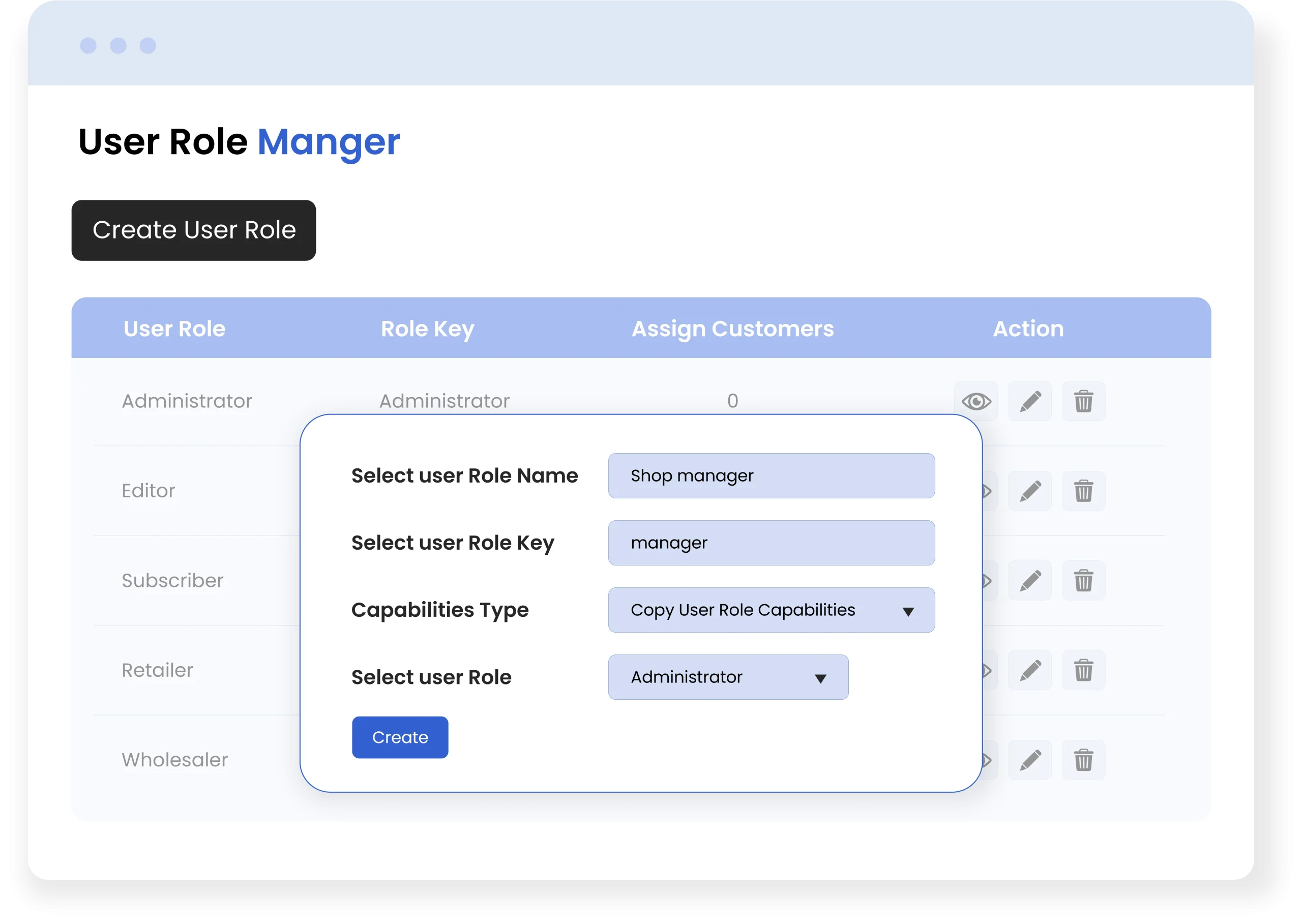
Add New and Edit Existing User Roles
With the B2B extension, you can create new and edit existing user roles. While creating new roles, you can add custom capabilities or inherit them from existing user roles, e.g., Admin, Customers, Subscriber, etc. You can also assign multiple user roles to a customer, but the additional roles will appear as secondary under the user detail page.
Note – User Role Editor for WooCommerce is also available as a standalone extension
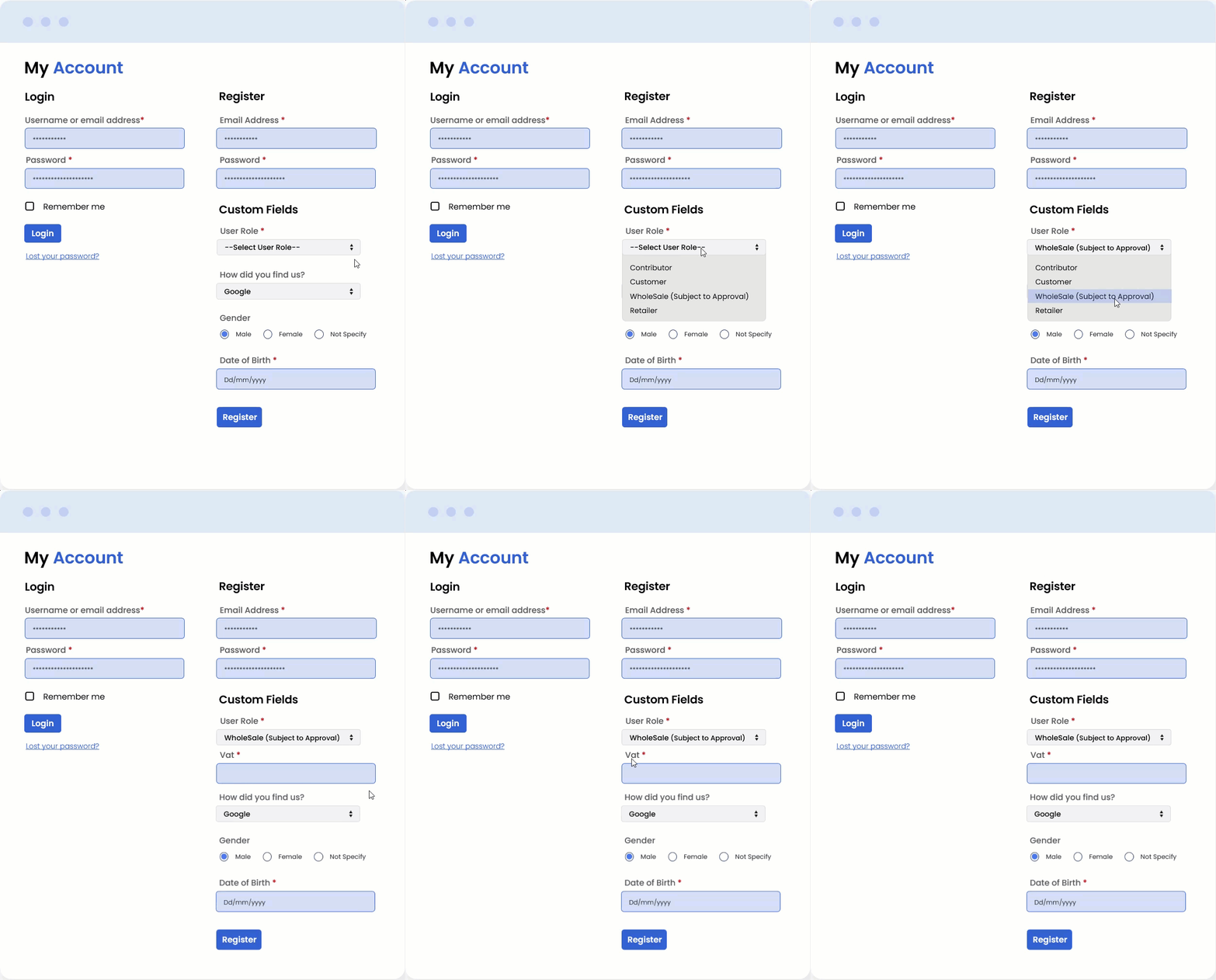
Extend Registration form for B2B Customers
B2B plugin for WooCommerce allows you to add custom fields to your existing registration forms. You can choose from 18 different field types and make them dependent on selected conditions or options. Admins can also show a dropdown for different user roles and specify fields according to wholesalers, retailers, distributors, etc. Easily collect desired information from B2B customers, validate submitted data, approve new users manually or automatically, and streamline the entire registration process with ease.
Note – WooCommerce User Registration Fields is also available as a standalone extension.
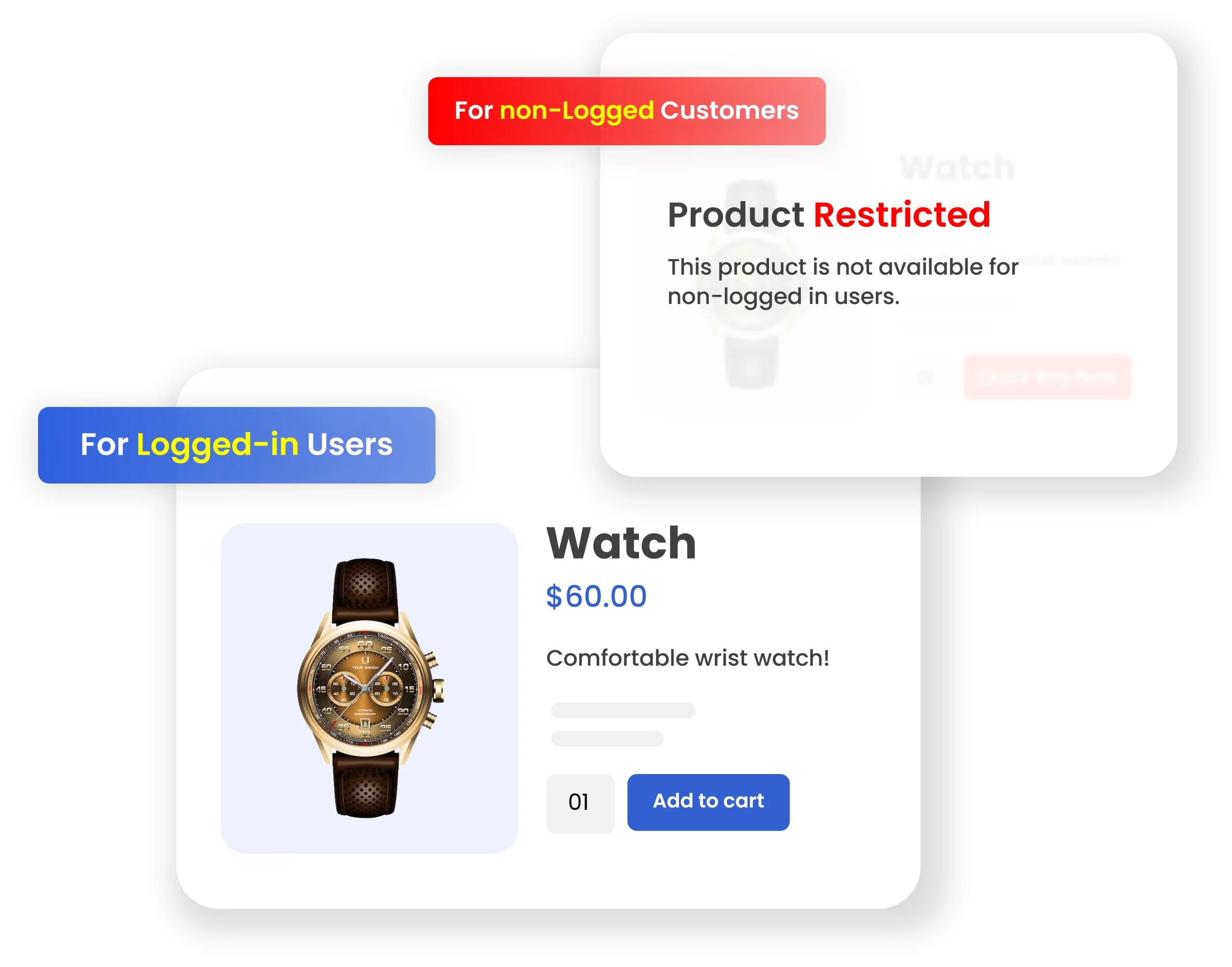
Manage Product Visibility By User Roles
With WooCommerce B2B solution, you can control product visibility by user roles. Simply choose to show or hide specific items from selected user roles and redirect restricted users to a custom URL. For example, you can restrict product bundles from regular customers and make them visible only to wholesalers.
Note – WooCommerce Product Visibility By User Roles is also available as a standalone extension.
Apply Role-Based Pricing
By using the plugin, you can add different prices for different user roles. Simply set up role-based pricing for specific products and categories. Allow general customers to see regular prices, while B2B users can view their assigned rates. Choose to apply surcharges or discounts, define a minimum or maximum quantity limit, control the entire purchasing behavior, and manage your overall pricing strategy.
Note – WooCommerce Role-Based Pricing is also available as a standalone extension.

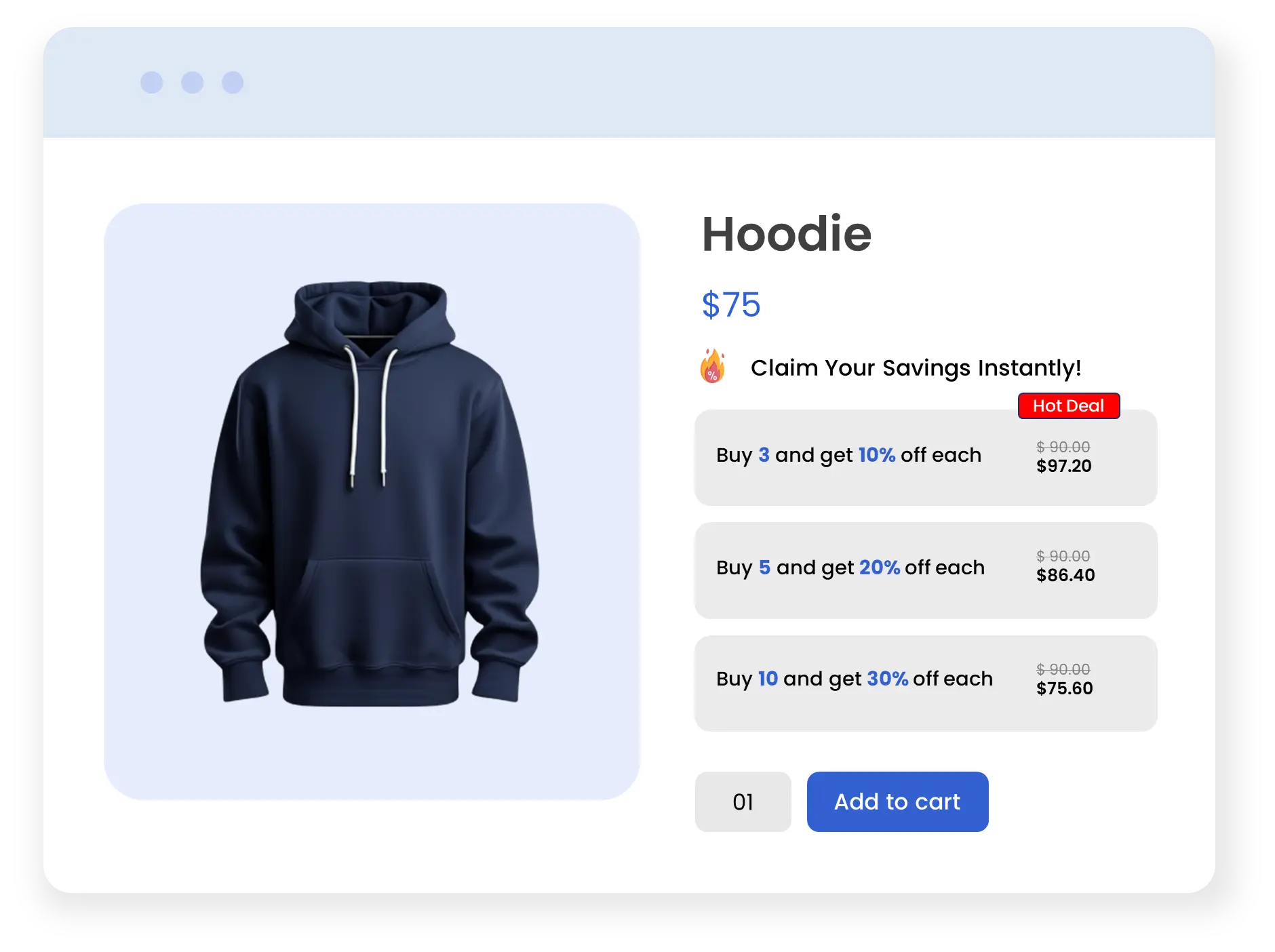
Add Quantity Based Wholesale Pricing Discounts
By adding incentives, you can easily convert potential customers into actual paying customers. With ultimate Woocommerce b2b & wholesale plugin, you can add quantity-based bulk discounts and encourage users to purchase in larger quantities.
You can also display minimum or maximum quantity limits along with custom error messages. Simply create a win-win situation by offering better prices for larger quantities while helping B2B customers save more on every purchase.
Note – WooCommerce Wholesale Pricing is also available as a standalone extension.
Complete B2B Quotation Management
B2B for WooCommerce makes receiving B2B quotations easy for your store. From the add-to-quote button that replaces the traditional add-to-cart to the quotation form, every feature is customizable in the WooCommerce B2B extension. You can style, change the background color and position for the add-to-quote button, add multiple quote statuses to let your customers know about the progress of their quote, and customize the quotation form by adding multiple fields to collect relevant information.
To inform customers and admin about the submission of quotes, you can send customizable email notifications. B2B also allows you to insert a quote button for out-of-stock products.
User roles, products, and categories can restrict B2B quotation management. Additionally, it is up to you to decide who converts the quote to an order. An admin can allow customers to convert their quotes to orders, while admins themselves can convert the quote to an order!
With B2B WooCommerce Plugin, create PDF files and include them with emails requesting quotes. Choose to select from 3 available quotes layout and customize the background color & text. Insert the terms & conditions text, along with the option to disable the PDF download for the customers in my account.
Note – Request A Quote For WooCommerce is also available as a standalone extension.

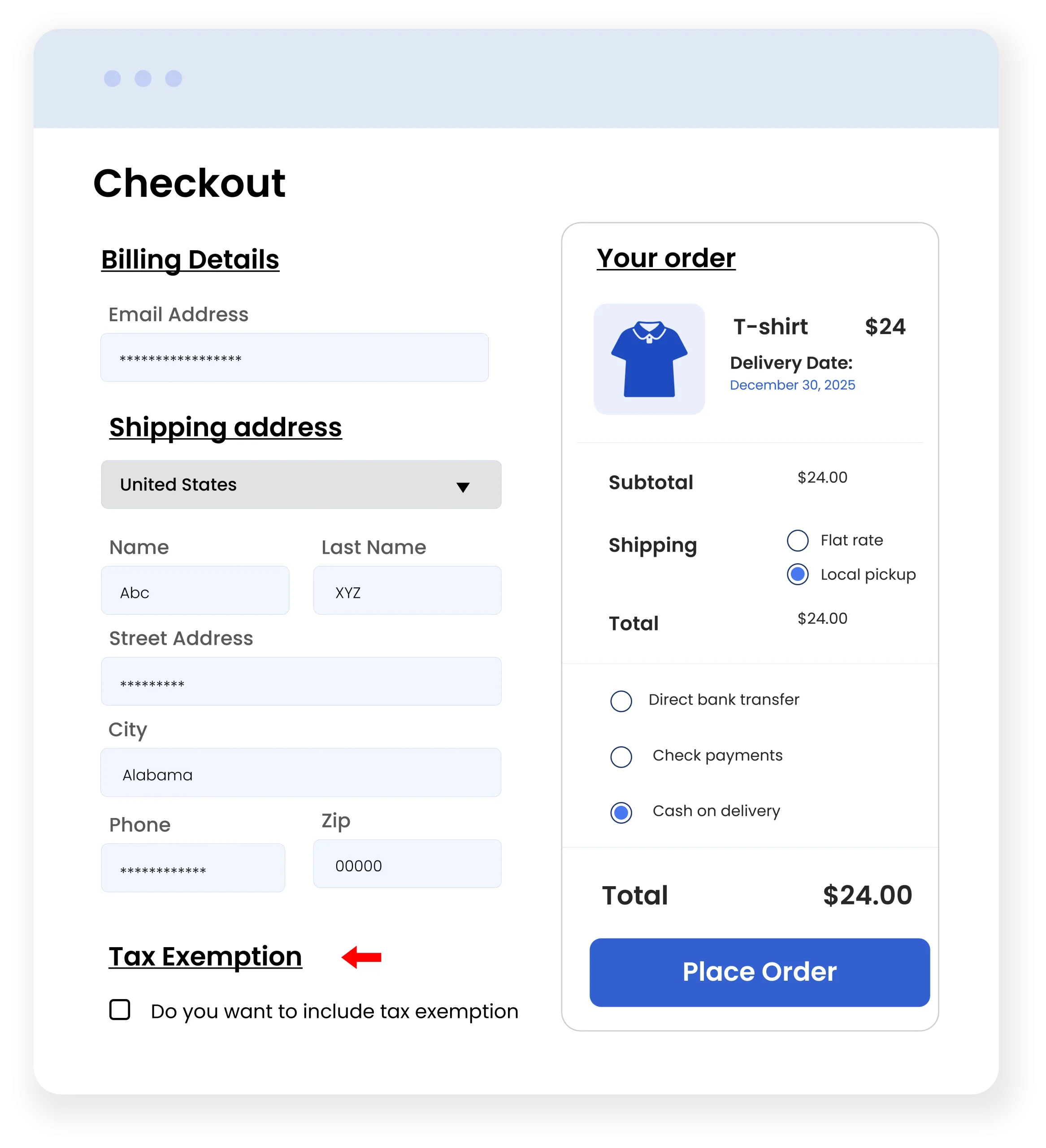
Offer Tax Exemptions and Manage Tax Visibility
WooCommerce B2B extension allows you to offer tax exemption to specific customers or roles. You can display taxes for selected user roles or choose to show prices with or without taxes. Simply add a customizable form and allow customers to upload required documents in the MY Account Section. Automatically approve exemption requests for specifc users and send custom email notifications to keep admins and customers informed.
Note – Tax Exemption WooCommerce is also available as a standalone extension.
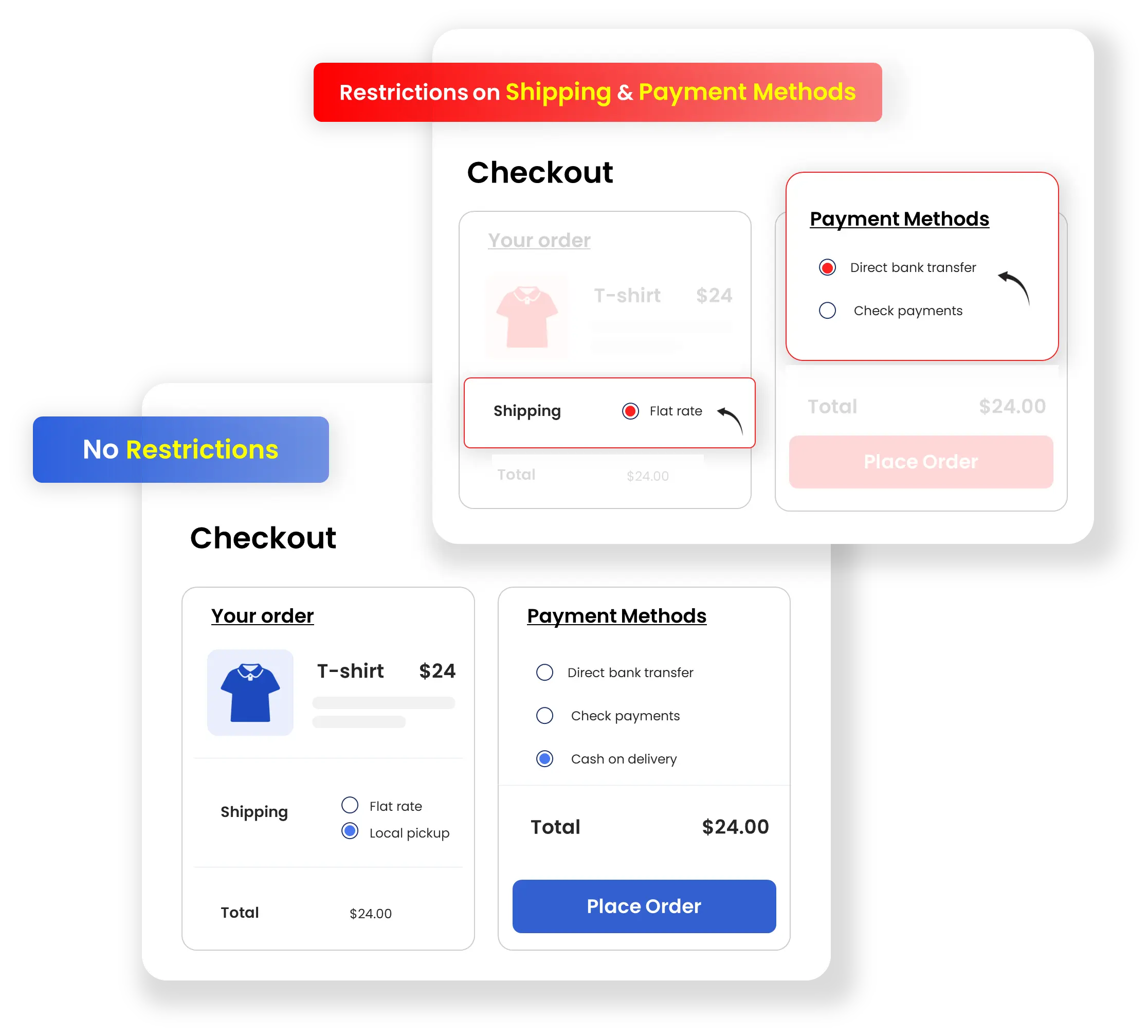
Set Restrictions on Shipping & Payment Methods
B2B offers you the option to manage your customers’ selection of shipping and payment methods. You can restrict shipping and payment methods for each user role, which saves customers delivery time and helps them pay customs and other taxes easily.
Note
For Shipping Restrictions – WooCommerce Advanced Conditional Shipping is also available as a standalone extension.
For Payment Methods – Cart and order restrictions are also available as a standalone extension.
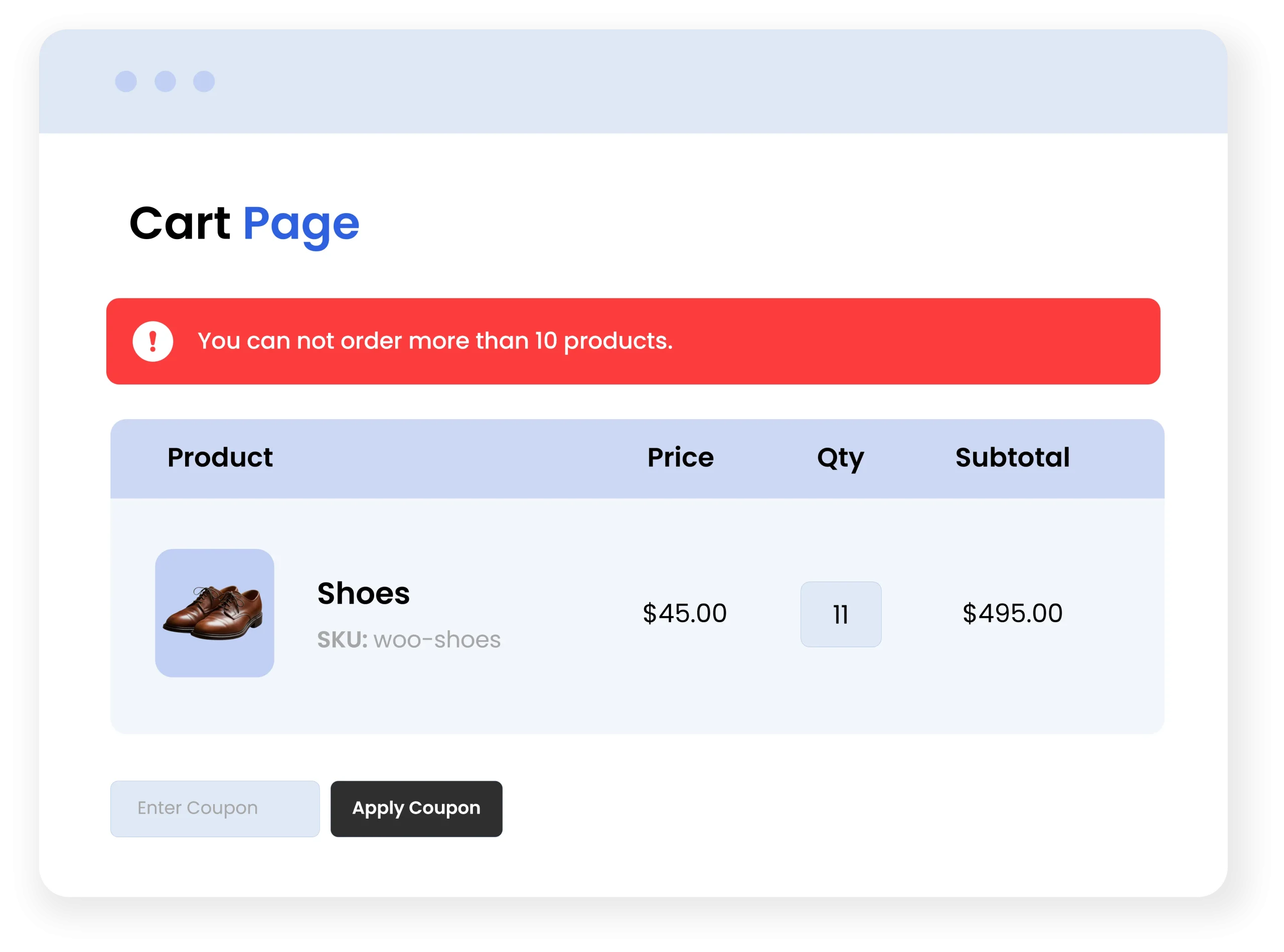
Apply Order-Based Restrictions
With B2B wholesale for WooCommerce, you can place restrictions on order amount and quantity for all or individual user roles. Choose from the following settings to set restrictions in place:
- Select customer and user roles
- Add min and max order quantity & amount
- Choose to compare the cart amount with the cart total or subtotal
- Add custom order restriction message
Additionally, you can show restriction messages to users by enabling messages on the cart and checkout page.
Note – WooCommerce Advanced Product Quantity is also available as a standalone extension
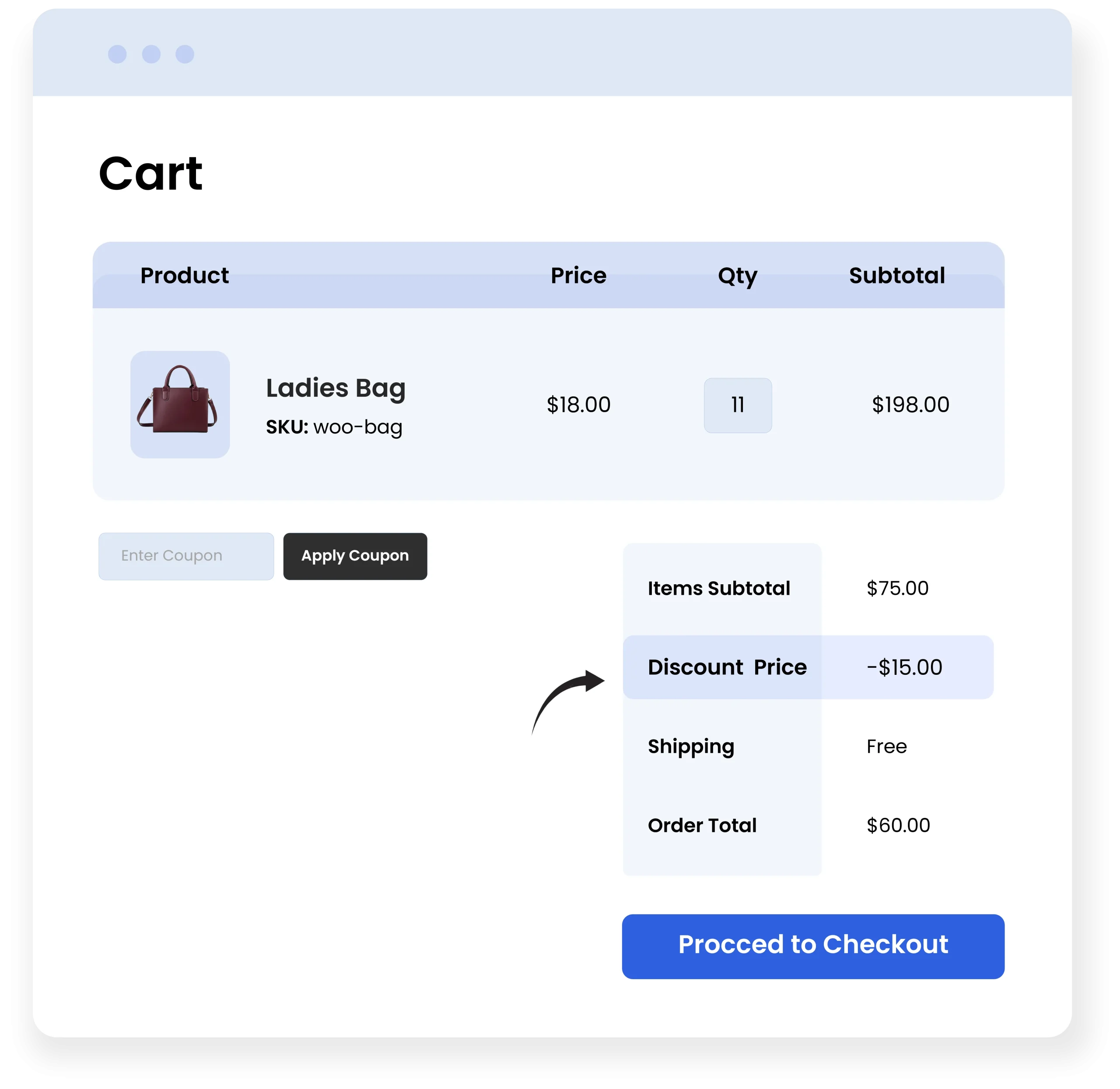
Configure Cart Level Discount Rules
The B2B WooCOmmerce Plugin allows you to easily create and manage multiple custom cart-level discount rules that match your store needs.
- Apply restrictions to the rule based on products, messages & dates
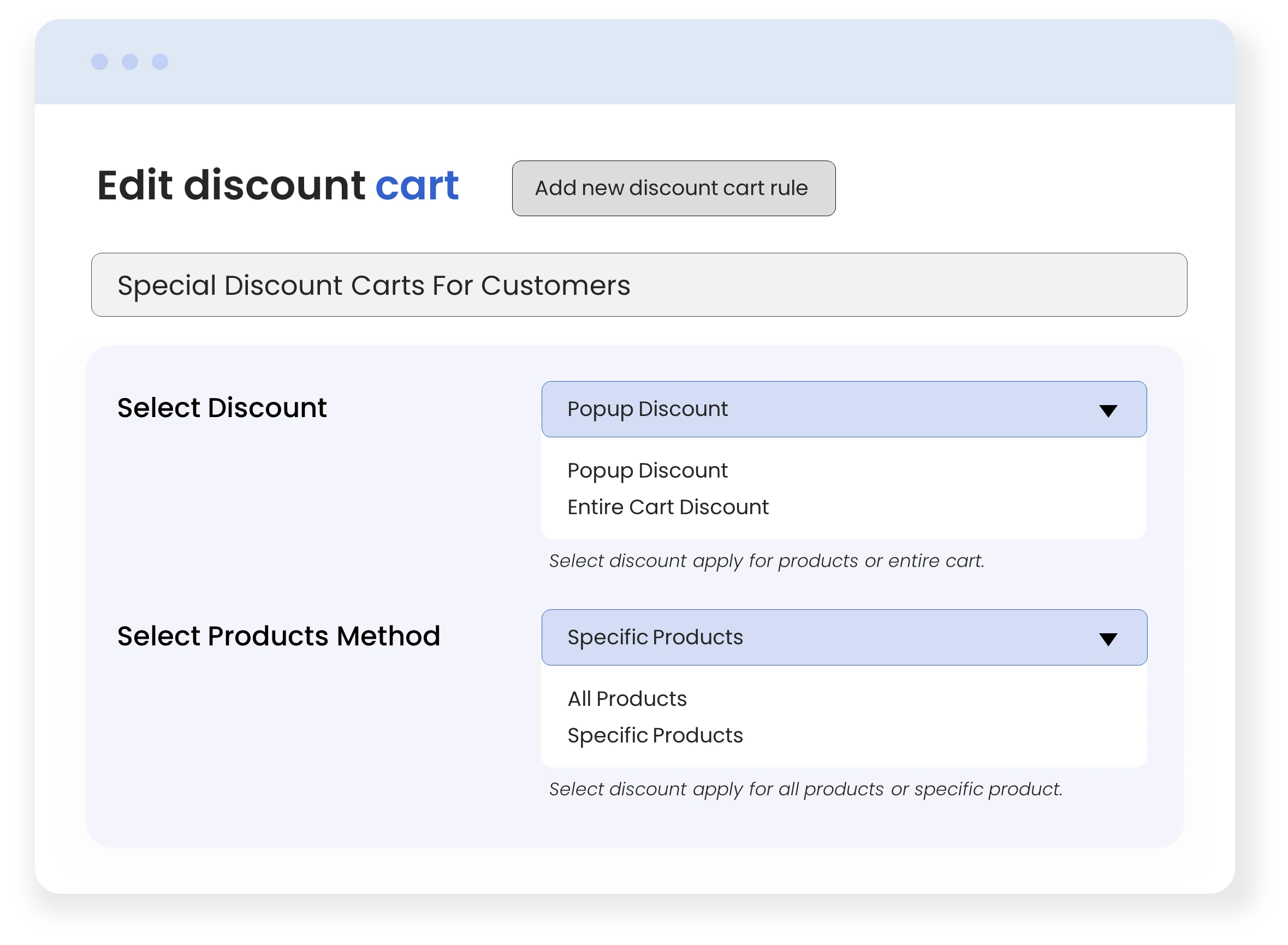
- Set restrictions on products by specifying the discount type as; “entire cart, specific product.”
- Specify certain products & product categories/tags
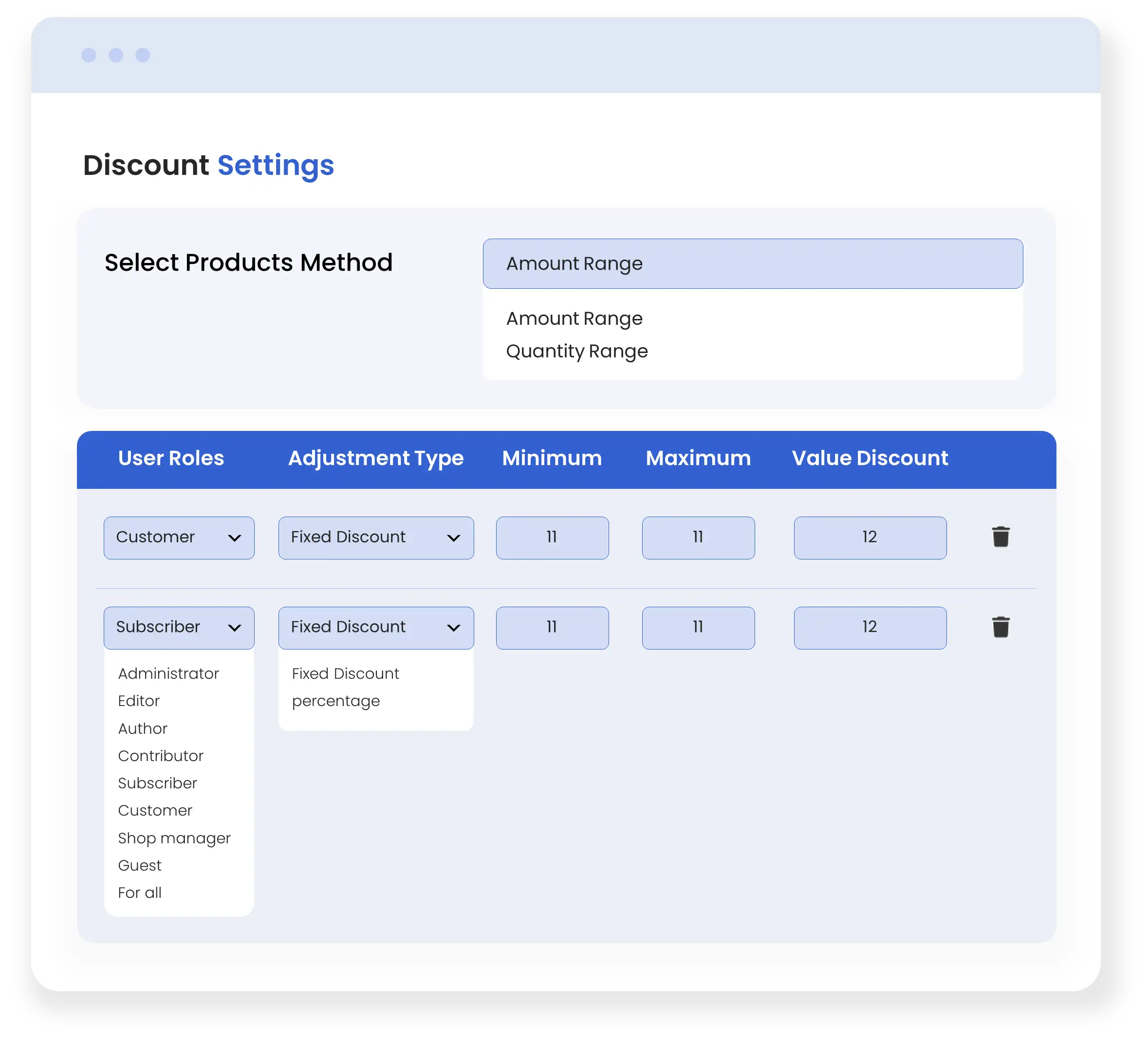
- Define discount based on the amount and quantity range
- Apply discount to product price & product subtotal
- Create multiple discount types specifying user roles, and adjustment types (percentage or fixed), and set minimum/maximum discount values
- Choose to showcase a discount and custom error message for success & notice before the discount is applied.
- Allows to block use of coupons if a cart discount has already been applied.
- Check Disable for B2B option & remove the cart discount if the product-level discount is applied using Addify B2B or Addify Role-Based Pricing
Note – Cart Based Discount for Woocommerce is also available as a standalone extension
Technical Compatibility
- Version 4.2.2View changelog
- WooCommerce version required3.5.0 or higher
- WordPress version required4.6 or higher
- Multi-Site SupportNo
- LanguagesEnglish, French, German, Italian and Spanish
- WPML CompatiblityWPML Supported
- CountriesWorldwide
Complete Features List
B2B Registrations
- Apply Google Recaptcha to B2B/B2C form
- Choose 18 different field types for B2B form
- Show user role dropdown on the registration form
- Manually or automatically approve new users at registration/checkout
- Manage and view new registration fields from log
- Perform bulk actions on all fields from field log
Complete Quotation Management System
- Add new quotes, quote fields and rules
- Show/hide request a quote button for out-of-stock products
- Show/hide Google Recaptcha
- Enable/disable Elementor/Divi Builder compatibility or another solution
- View complete quote info from log
- Edit and delete quotes, rules, and fields from log
- Convert quote to order
Manage Product Visibility by User Role
- Utilize global settings to show/hide products/categories to all
- Redirect users through a custom link or message
- Manage search engine crawl permission
Manage Pricing by User Roles
- Enable tiered pricing
- Enforce max/min quantity of orders
- Display custom error messages
- Manage all rules from log & apply bulk actions
- Offer discounts to selected customers
- Import role-based prices with product, user role & discount info
Offer Tax Exemption to Customers
- Manually or automatically approve exemption requests
- Show tax exemption status on my account page
- Display custom tax exemption messages
Restrict Payment & Shipping Method
- Set role-based payment and shipping method limitations
- Apply restrictions on guest users as well
- Choose from 11 user roles to apply restrictions
Order-Based Limitations
- Choose to compare cart amount with cart total or subtotal
- Add custom order restriction message
- Show restriction messages on cart/checkout page.
FAQs
Can we add custom fields to the registration form?
A- Yes, you can add unlimited customized fields in the registration form.
Is B2B for WooCommerce compatible with third-party user role extensions?
A- Yes, this plugin is compatible with other user role extensions.
Can restricted users be redirected to other pages for a better user experience?
A- Yes, with B2B for WooCommerce, the admin can redirect restricted users to any URL of their choice.
Can we customize the “request a quote” button in this plugin?
A- Yes, add custom text and set a custom redirection link for the request a quote button.
When a quotation management system is set up, do all customers have to submit quotes in order to make a purchase?
A- No, you can enable a quotation system for specific user roles only, the rest of the customers will be able to make purchases without submitting quotes.
Can the customer be updated with the quote status?
A- Yes, the admin can assign quote status to submitted quotes i.e pending, in process, canceled, accepted e.t.c
For wholesale customers, can we show quantity-based pricing?
A- Yes, you can show tiered pricing tables to display quantity-based pricing.
As mentioned B2B for WooCommerce features Addify’s best selling extensions, what extensions are those?
A- B2B for WooCommerce is an ultimate wholesale solution and it includes 5 of the following extensions: - Custom User Registration Fields for WooCommerce - Product Visibility by User Role for WooCommerce - WooCommerce Role-Based Pricing - Request a Quote for WooCommerce - Tax Exempt for WooCommerce
Do restricted customers see a custom error message?
A- Restrictions can be applied on payment methods and by product visibility and in case of restrictions you can redirect restricted users to a custom URL or show an error message.
Customer reviews
Showing 1–6 of 154 reviews
- Quick and helpful support teamThe Addify support team is very quick and responsive. They fixed my issues within 24h!
- Best B2B solution for WooCommerceWe have been using B2B for WooCommerce by Addify in a client project focused on selling health products and services, and the results have been excellent. The role-based pricing functionality has allowed us to set different price structures depending on the type of customer, which was a key requirement for the business. In addition, the Request a Quote tool has been very valuable, as it provides customers with an easy way to request personalized quotes for their plans. Also, the support team is excellent: they have helped us resolve some technical challenges, strengthening the implementation experience and the overall use of the plugin. Great work, Addify!
- Excellent Plugin – The Ultimate B2B SolutionThis plugin has exceeded my expectations! It covers almost every B2B feature I needed in my WooCommerce store — all in one place, without having to install a bunch of separate plugins. The interface is user-friendly, and the features work perfectly: user role management, custom pricing, product/category visibility, quote system, quantity-based discounts, and much more. It saved me time, money, and headaches. Highly recommended to anyone running a B2B or hybrid B2B/B2C store!
- Offers great functionality + great support
- Totally worth the investment!The level of flexibility this plugin provides is amazing. We’ve been able to separate our B2B clients with custom pricing and visibility settings effortlessly
- Extremely happy with the resultsThis plugin has given us full control over user roles and pricing. Our wholesale customers now feel like they have their own private storefront.
Rob White –
Such functinality in such price, B2B for WooCommerce is magical.
Chloe Scott –
Great product and even better support.
Charles Stile –
Every feature of B2B for WooCommerce is essential, if you don’t want any feature now, you will need in future believe me as an owner of a B2B Platform
Carmine DeMarco –
The amount of features in B2B for WooCommerce is astonishing, highly recommended
Daniel Sinclair –
B2B for WooCommerce offers essesntial features, its like a bundle of plugins packed together to make a all in one solution!
Lucas Reed –
Love the pricing visibility control features.
Harper Scott –
Great documentation and setup took minutes.
Bill layton –
I think Addify’s B2B for WooCommerce is essesntial for every digital B2B business owner
Charlotte Gonzalez –
Simple, powerful, and exactly what we needed.
Harper Jenkins –
We installed it, did minimal tweaks, and it was live the same day. That kind of reliability is rare with Woo plugins.
Sebastian Martinez –
Some plugins are a nightmare to configure. Not this one. The settings are well-organized, with tooltips and documentation where it matters.
Elowen Mercer –
We run a hybrid B2B/B2C store, and this plugin made it super easy to segment our audience. The pricing tiers and quote request feature are favorites among our wholesale customers.
James Brown –
We ran into a minor theme conflict, and their support resolved it with a customized solution within 24 hours. Can’t ask for better service.
Elijah Cooper –
We thought we’d need custom coding to achieve our workflow, but this plugin had everything built in. Role-based pricing, login-based visibility, and custom registration.
Charlotte Roberts –
From custom login redirects to pricing visibility, everything is handled in a smart and scalable way.
Dylan Davis –
Great solution for separating B2B and retail customers.
Anthony Levesque –
B2B for WooCommerce is a complete package for any WooCommerce store
Russano Fuentes –
Added custom fields, edited quote fields, added request a quote instead of price, contact form in place add to cart and yet I am only 5% done with B2B for WooCommerce’s functioanlies
Stuart McClellan –
B2B for WooCommerce provides more value for less price
Jamez Durazzi –
Price variation and custom fields plugins combined cost more than this plugin while B2B for WooCommerce provides those and my other features in lesser price which impresses me a lot.
Evelyn Stewart –
Great value for the feature set.
Luis Hernandez Sr. –
This plugin really is a great deal and it helps me a lot in managing my store. Have been using it for the last 5 months and have had no issues so far, would love to see the link visibility in the menu getting fixed by the next update.
luis.pereira –
Good plugin and excellent support.
John Fassbender –
One thing I have noticed is store’s loading speed significantly increases when I use B2B instead of using all the plugins included, individually!
Claudio Van Hammer –
I was going to purchase this plugin from your WC marketplace account, but then I bought it from the addify.store because you get the same great support and the prices here are quite low.
Dale Ehrmantraut –
It’s impressive to see how frequently the plugin gets updated and the most recent update brought in tones of new features. Definitely worth the money!
Ava Adams –
Clear documentation and simple admin panel.
Zoey Rivera –
Hiding prices from guests was a game-changer for us.
Dylan Carter –
Easy to set up, and our customers love the new experience.
John Freedman –
Just needed quotation and tax exemption plugin which is why I bought b2b for woocommerce but after installation I realized that all of its components are equally as useful .
Ryan Garfield –
Undoubtedly it’s one of a kind extension
Matthew Roberts –
Finally a B2B plugin that’s actually user-friendly.
Peter Ochoa –
Best b2b plugin for woocommerce
Luís –
Simple and easy plugin!
Support is very helpful and available to solve any situation.
I recommend it to anyone looking for a B2b solution and request quote.
Brian Morgan –
I have configured this plugin in 5 of my stores and never in my life faced any serious issue, once I had a small issue with rule management but the support looked after it really well.
Bryson Maverick –
Used b2b to limit product visibility and to offer products at different prices to different user roles and faced no issues yet.
Phil Cosby –
Just got it in the black friday sale and let me tell you this, its a total bargain the features are worth way more than what its normal price is
Matt Lindenberg –
This package has made my life so much easier. It has got everything that I needed for my b2b store.
Savannah Campbell –
Compared with other plugins we tested, this one offered better value, more control, and faster performance.
Nolan Colton –
This is the most complete B2B plugin I’ve come across for Woocommerce. I’ve been using it for a while now and it surely ticks all of the boxes. it does everything it says it’ll do and more.
Jase Kayden –
Super effective plugin, multiple options of price display, offers, quotations, excellent extension! I’ve been looking for a long time for such a plugin. Really worth the money, it simply works!
Bobby Masson –
If you want to manage B2B customer registrations separately I recommend this plugin, because I am also using this plugin for B2B customer registration management. This plugin works perfectly on it. I found many more very helpful features in this plugin that helps me to manage many things in my store.
Madison Carter –
No CSS issues, no conflicts, just a smooth experience.
Kayla Louis –
This is the best plugin for B2B & B2C Ecommerce. This plugin is very versatile and feature-rich. The best thing is the support team, they are always available quick to respond and ready to help. 10/10 Recommended!
Noah Norman –
The best plugin for B2B needs. Its manage Everything from user roles to tax settings.
Roy Vincent –
The best feature I found in this plugin is that this plugin has the option to limit product viability by user role. That helps me a lot to manage my store easily. Thank You team Addify for this feature rich plugin.
Henry Clark –
You buy it, install it, and it does exactly what the feature list says. That’s rare these days.
Ava King –
With Addify, we can now show different pricing to our wholesale customers and control who sees what. No complaints at all.
David Stewart –
The features of the WooCommerce B2B Plugin are impressive, especially in managing quotes and pricing. However, we found the documentation a bit lacking. More detailed guides would be beneficial for users.
Brisa Keller –
This plugin has been a reliable solution for our B2B needs. The fact that it’s approved by the WooCommerce Marketplace gives us confidence. The pricing is reasonable for the extensive features it offers. We’ve seen an improvement in our operations since implementing it
Liam Parker –
The ability to approve new users manually and assign them roles automatically is a big win for us. Clean UI and straightforward admin options.
Jackson King –
Very well-documented, which made it easy for our dev team to configure and extend it. Strongly recommended.
Andrew Abbott –
The WooCommerce B2B Plugin by Addify.Store has proven to be a game-changer for my business. The features, especially the quotation management system and user role pricing, are exceptional. The support team is quick to respond and incredibly helpful.
Alfred Myers –
The user role management and product visibility control features are exactly what I needed.
Dale Mcdaniel –
A good plugin with lots of features. The user interface design could be improved to make it more user friendly.
Jackson Russell –
It covers everything from hiding prices to custom registration workflows. Definitely a product built with care.
Amelia Lewis –
We were hesitant at first, but this plugin has exceeded expectations. From role-based pricing to registration forms, everything is so well thought out.
Van Thornton –
Highly Recommended
Grace Thomas –
Support team is exceptional, Had one question about pricing rules, and they responded quickly with a detailed solution
Howard Curtis –
I’m highly recommend this plugin. It has user friendly and excellent support
Al Rodriguez –
This plugin is all in one solution that replaces several plugins. It’s easy to use and includes great features like tiered pricing and control over product visibility.
Phillip Foster –
This plugin Works well with many useful features. I’ve come across a few bugs, but the support team is quick to help.
Joel Patrick –
This plugin is very impressive with all the features we need for my B2B business. The quotation system and tiered pricing have been especially great featrure.
Joel Green –
Great plugin. The tiered pricing and order limitations are particularly useful. It took some time to set up, but it’s been working perfectly
Jeannette Wilborn –
Totally worth the money! This plugin does a lot of things in this price range and also support team is quick and friendly.
Catelyn Hawkes –
B2B plugin goes beyond our expectations, providing a seamless experience for both administrators and customers. Its adaptability and ease of use make it a solid choice
Blakely Winters –
Same functionality as I thought. Great Plugin
Morris Lloyd –
This plugin has all the features I need for our B2B store. Registration, pricing, and product visibility options are excellent.
Jared Norman –
Room for improvement
Delores Colon –
This plugin has alot of features but sometimes its hard to use. Making it simple would be more helpful.
Owen Bass –
Managing wholesale customers is very helpful. The custom user roles and registration fields are exceptional
Arturo Drake –
very helpful.
Gianni Miles –
Easy to use
Andrew S. Millikin –
I use this plugin for long time. I tried the others, too. But, Woocommerce B2B by addify is the best one.
Tyler Schuman –
Its really useful plugin
Matthew Marie –
Works okay, but found some issues latest resolved with the help of customer support
Adam Ford –
Really happy with how well this plugin works, with a lot of features !
Ralf Faerber –
Quick customer support and team helped in clearing doubts.
Nicholas Rose –
Highly recommend
Darren Gonzalez –
This plugin doest what i need But first time it took time to configure.
Gloria Sharp –
I recommend this plugin for its great features, and its user-friendly interface
Frank Edwards –
This plugin is best for my budget which have functionality of more the 5 plugins
Kyle Long –
Great feature! Easily adjust prices based on user roles.
Tom Hopkins –
This plugin is managing my wholesale customers. It’s simple to use and packed with features like customizable forms and pricing. Highly recommend!
Dave Moody –
Thank you, team. It’s got everything that I need to run things smoothly. I do recommend this plugin to all online store owners
Tyson Adams –
best extension so far i ever used
Cristina French –
This plugin helps a lot especially it quotation system I really like it.
Pat Schwartz –
This plugin works great. But the most valuable thing is the customer support. They help me out with my questions super quickly and professionally, usually within an hour. They’re doing a great job
Suzanne Ryan –
Overall exerience with plugin is ok
David Arias –
The tax exemption feature is useful for wholesale customers
Zachariah Bautista –
Very Good plugin with many functionalities
Noah Nelson –
Our store needed flexible pricing and customer group segmentation, this plugin delivered everything and more. It’s lightweight, customizable, and works seamlessly with our theme.
Houston Foley –
This plugin offers a lot of helpful features at a good price but sometime i need customer support for help
Elijah Riggs –
Work Perfectly as i expected
Michelle Morton –
Great Support and Great plugin
Kelvin Jordan –
This plugin is really nice, its work perfectly and very useful plugin for my Woocommerce store.
Web3 Company –
Customer service is super fast! Great support! They supported me greatly with a video call! 5 stars guaranteed!!
Cornelius Estrada –
I love the features. It improved my B2B operations, though setup was a bit complex but Support was very helpful.
Geoffrey Walsh –
This plugin is highly customizable and easy to use. I’m really impressed with ability of this plugin
Sean Fullerton – LSEOI –
Had a small conflict with another plugin and Sania was very quick to respond and had the issue resolved within a couple of days. Great support
Bobby Thornton –
This plugin simplifies managing quotes, pricing, and product visibility. It has many useful features and was easy to set up.
Kenneth Kain –
Fantastic plugin
Scarlett Skinner –
I’m happy with how the B2B for WooCommerce plugin handles pricing and product visibility. It’s a good tool
Travis Russell –
I’m impressed with the plugin’s features, like advanced product visibility and cart discounts. It also handles quotes and tax exemptions very well. The setup was a bit tricky and took some time, but once everything was configured, it worked great!
Jareth Nightwi –
This plugin offers everything I need in one package. It’s made managing my store much easier, and I’m very pleased with the results
Mark Koch –
This plugin has added so many features to my WooCommerce store. It’s exactly what I needed to make things better. I’m really happy with it.
Louis Bauer –
works well.
Dario Messin –
I’ve been using this plugin for a while, and it’s been really reliable.
Jorvik Stonefist –
I’m really impressed with this plugin. It has all the features I needed, and the support team has been great. I totally recommend it!
Elliot Mills –
This plugin has really improved our store. Being able to manage both B2B and B2C customers in one place is a huge help. I highly recommend it.
Eddie Frost –
The plugin works well and has many useful features. I had to adjust a few things to make it right but I’m happy with the results.
edward gallegos –
The support team is great! They helped me with the setup and answered all my questions quickly. Great service.
Jordyn Gomez –
This plugin has many useful features in one package. It’s definitely worth it.
Gudric –
Plugin work perfectly, and the features are well-designed. The order limits are really helpful for handling large orders
Oliver Warren –
We had a few issues while setting up the plugin, but support responded quickly and helped us get everything working.
Brian S. Ellis –
This plugin has everything we need for managing B2B operations. It covers everything, from custom pricing to user roles.
Josue C. Farrow –
This plugin has been a great addition to our WooCommerce store. It has all the features we need to manage both B2B and B2C customers. I highly recommend it!
Matthew Miller –
The level of control this plugin gives us over user roles, pricing, and registration is amazing. We’ve tried other plugins before, but this one actually feels like it was built by people who understand wholesale business needs. Support has also been quick and helpful.
Andre Ward –
Great Plugin.
Ellis Reid –
This plugin is a must-have for any WooCommerce store! It works well and adds a lot of value with its useful features.
Cedric Noiret –
The plugin’s ability to hide prices and the add-to-cart button for specific users has helped us manage our B2B and B2C clients more effectively
Thalia Kessler –
The tax exemption feature is invaluable. It simplifies compliance and ensures our clients are charged appropriately
Aiden Fraser –
Great plugin with useful features. It has made our processes smoother and managing our store much easier.
Henrik Vosberg –
The plugin’s integration with our existing WooCommerce setup was seamless. It’s been a valuable addition to our toolkit
Linnea Darrow –
The plugin definitely covers a wide range of B2B needs. But a setup wizard would be a great addition
Lane Ford –
I definitely recommend this plugin. It’s well-designed,, simple to use, and has really improved how our store runs.
Isolde Thorne –
It delivers what it promises. The only downside for us was that some settings are tucked away and not super intuitive at first. But once configured, it’s powerful
Joshua Miller –
Works well for the most part. It helps a lot by showing different products and prices to different users. We had a small issue with theme compatibility, but support helped me fix it.
Ronan Veseli –
Integrating the quote system has been a game-changer. Clients can request quotes effortlessly, and we can manage them all in one place
Saffron Vale –
Solid plugin with lots of potential
Ashley Robinson –
This plugin has a lot of useful features for B2B stuff. It took me a little time to figure everything out in the beginning, but once I got it set up, it started working great.
Alaric Devane –
Functionality is there, but the documentation could be more detailed. Had to reach out to support for clarification
Brianna Lewis –
Customer support was great. They replied quickly and helped me with all my questions
Isolde Fennimore –
The customizable registration forms allowed us to gather essential information upfront. It’s made onboarding new clients much smoother
Nathan Price –
This plugin has everything we need for managing B2B operations. It covers everything from custom pricing to user roles.
Bram Holloway –
Love most of the features, especially the ability to hide prices from guest users
Sophie Müller –
Addify.store offers reliable and cost-efficient ecommerce solutions, Had a great experience with in past as well.
Lucas Dubois –
This plugin has been a great addition to our WooCommerce store. It has all the features we need to manage both B2B and B2C customers
Leif Carrington –
Impressed by how many small, useful features are packed into one plugin.
Thayer Winslow –
Our site now feels more professional and tailored
Seraphine Eltz –
Setting up tiered pricing was a breeze. Our bulk buyers appreciate the clarity, and it’s boosted our sales
Anouk Delmare –
We’ve used a few B2B tools in the past but this is by far the most complete. Really impressed by how smoothly the registration approvals and quote functions work
Emma Rossi –
Plugins offered by Addify are always good, with a highly professional customer support team.
Thomas Clarke –
Great plugin with useful features. It has made our processes smoother and managing our store much easier
Mic Thompson –
This plugin is a must-have for any WooCommerce store! It works well and adds a lot of value with its useful features
Aiden Fraser –
I definitely recommend this plugin. It’s well-designed, simple to use, and has really improved how our store runs.
Ellis Reid –
Exactly what I needed for our wholesale store, This plugin made managing B2B customers so much easier for us
Lucien Karloff –
The ability to manage product visibility based on user roles has streamlined our operations. Our wholesale clients now see only what’s relevant to them
Caius Whitlock –
This plugin has given us full control over user roles and pricing. Our wholesale customers now feel like they have their own private storefront.
Silas Hawthorne –
The level of flexibility this plugin provides is amazing. We’ve been able to separate our B2B clients with custom pricing and visibility settings effortlessly
robertmicallef90 –
Offers great functionality + great support
Max Khait –
This plugin has exceeded my expectations! It covers almost every B2B feature I needed in my WooCommerce store — all in one place, without having to install a bunch of separate plugins.
The interface is user-friendly, and the features work perfectly: user role management, custom pricing, product/category visibility, quote system, quantity-based discounts, and much more.
It saved me time, money, and headaches. Highly recommended to anyone running a B2B or hybrid B2B/B2C store!
JAVIER FERNANDEZ –
We have been using B2B for WooCommerce by Addify in a client project focused on selling health products and services, and the results have been excellent.
The role-based pricing functionality has allowed us to set different price structures depending on the type of customer, which was a key requirement for the business. In addition, the Request a Quote tool has been very valuable, as it provides customers with an easy way to request personalized quotes for their plans.
Also, the support team is excellent: they have helped us resolve some technical challenges, strengthening the implementation experience and the overall use of the plugin.
Great work, Addify!
Sem –
The Addify support team is very quick and responsive. They fixed my issues within 24h!